Moving Forward: Google I/O 21 Android Gradle Plugin Update Summary
It's been nearly a month since Google I/O 2021. In the past few days, I've been reviewing the Android Gradle Plugin (AGP) content, mainly focusing on the "What's new in Android Gradle plugin" session. However, since there was no Google I/O in 2020 and all offline events were suspended due to the pandemic, this 11-minute session contains an enormous amount of information - it's essentially a condensed highlight of the past two years' updates (I watched it three times). Therefore, in this article, I'll include many additional reference materials, digging into talks/posts/repos that you might have missed in the past year or two. The overall structure still follows the session's agenda.
Performance Improvements
Configuration Cache
Gradle's lifecycle is divided into three major parts: Initialization Phase, Configuration Phase, and Execution Phase. The task execution part can already be well cached and reused if handled properly - reusing existing caches is a crucial part of speeding up compilation. If this mechanism is applied to other phases, it should naturally bring some benefits as well. The next most time-consuming phase after execution is usually the configuration phase, and this year AGP brings us Gradle Configuration Cache support, a new feature that has been incubating since Gradle 6.6. It enables the main output of the configuration phase - the Task Graph - to be reused. In the example project, this optimization can eliminate about 8 seconds of unnecessary waiting (if Gradle script configuration hasn't changed).
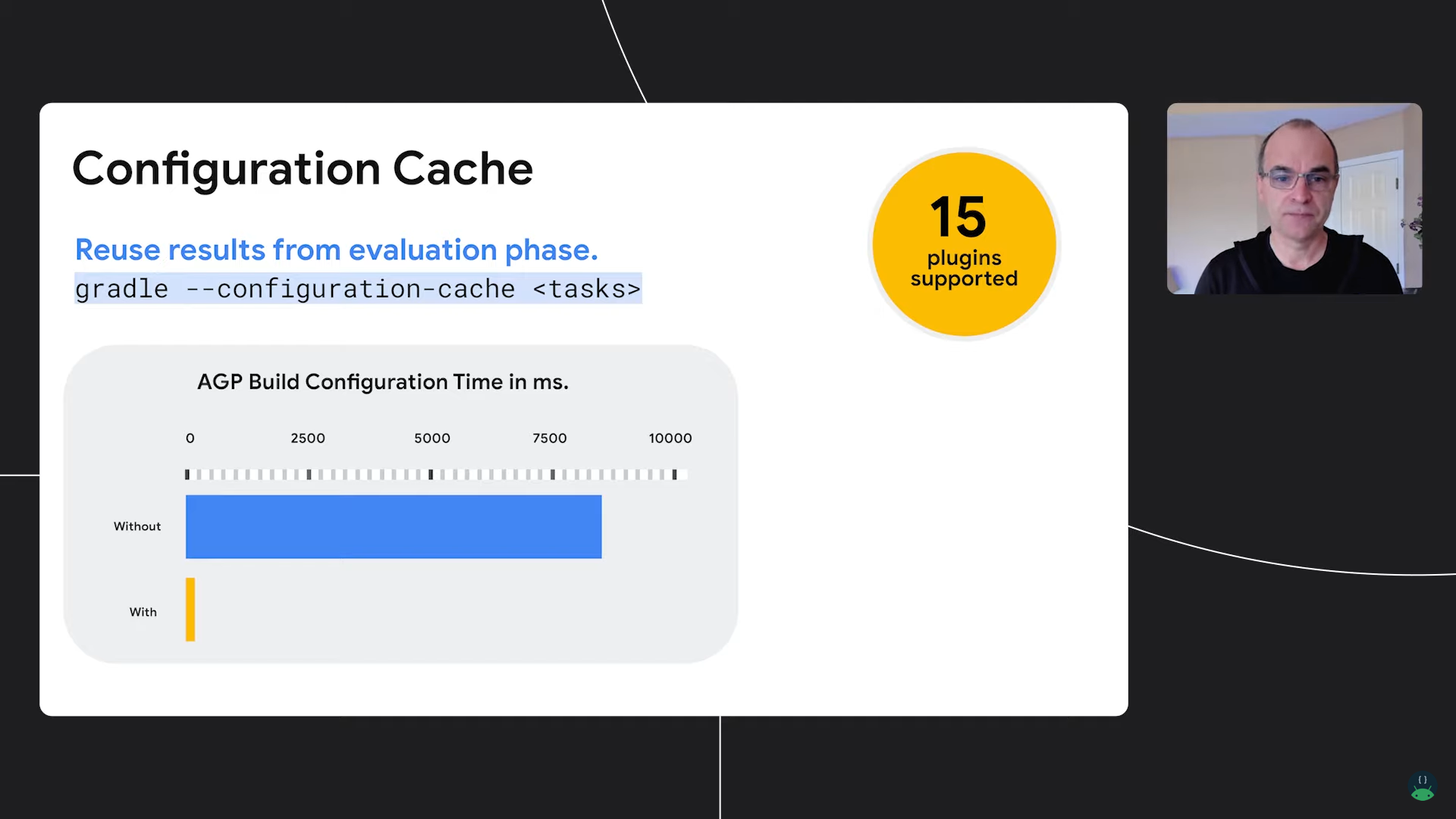
To experience this optimization, simply add --configuration-cache when executing Gradle commands, such as ./gradlew --configuration-cache help. Since Configuration Cache is not yet fully stable, if you want to keep it enabled (including optimization during IDE Sync), you need to use the following properties:
org.gradle.unsafe.configuration-cache=trueOn first use, you'll see a prompt about calculating the Task Graph:
Calculating task graph as no configuration cache is available for tasks: :test-app:assembleDebug
On success, it will prompt at the end of the Build:
Configuration cache entry stored.
Then the Cache can be reused by the next build (if there are no build script modifications):
Reusing configuration cache.
...
51 actionable tasks: 2 executed, 49 up-to-date
Configuration cache entry reused.
As a plugin user, if you find that commonly used plugins are unsupported, you can first search whether the same issue has already appeared. For example, here's an issue that occurred with Kotlin 1.4.32 plugin and Gradle 7.0:
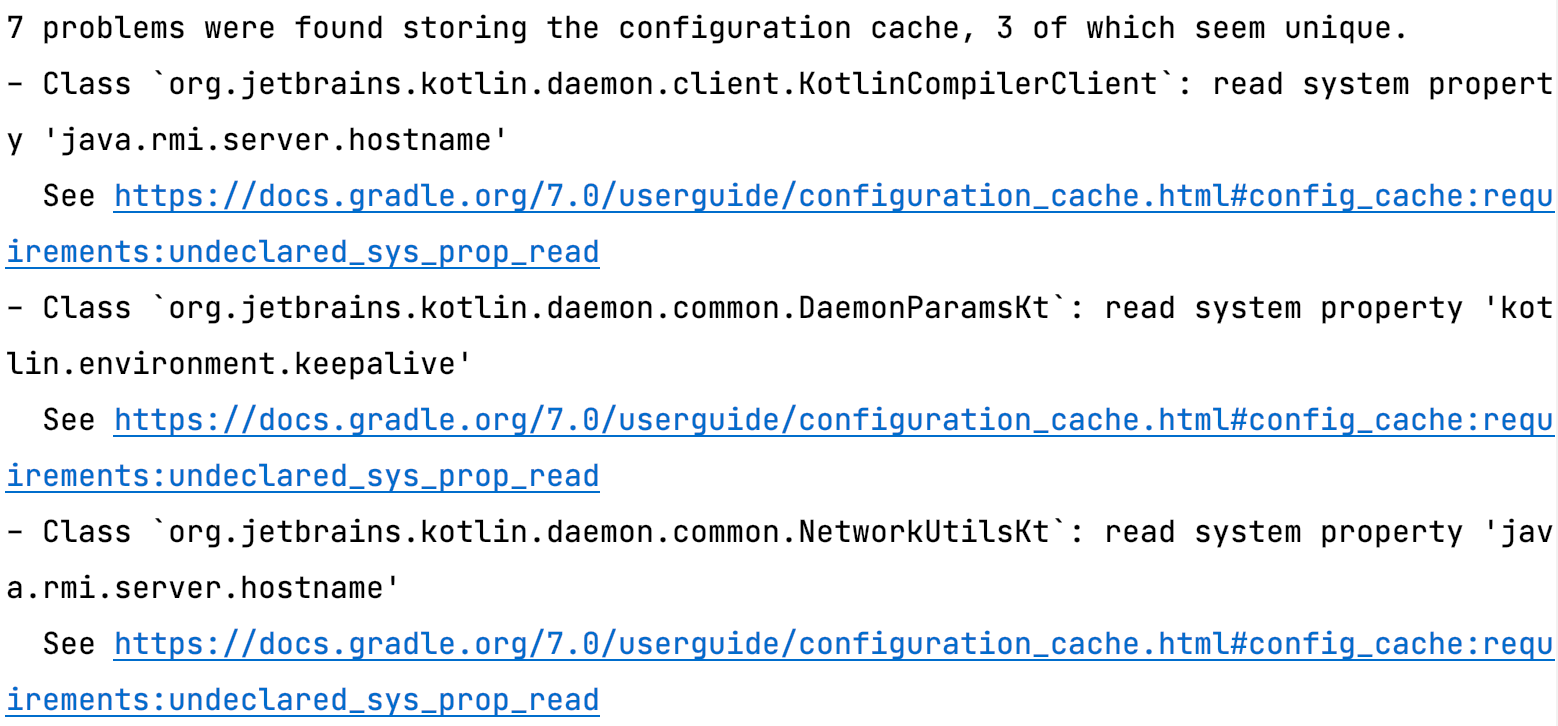
In this YouTrack issue, we can see that upgrading the Kotlin plugin to version 1.5.0 or above solves the problem.
In fact, the core plugins of AGP/Kotlin/Gradle (mainly the Tasks behind them) already support Configuration Cache in recent versions. You can learn more through these documents/issues:
- Help community Gradle plugins adopt the configuration cache #13490 - Gradle Github Issues
- Gradle Properties Change - Android Gradle Plugin 4.2 Release Note
- Gradle Configuration Cache Support - Kotlin Doc
As a plugin developer, you also need to be concerned with Configuration Cache adaptation work. The key point is: Task parameters and internal implementations need to avoid directly passing in/using Gradle's Context classes and some non-serializable classes. Taking my maintained Seal plugin as an example, it's a small plugin that solves AndroidManifest.xml conflicts. Running /gradlew --configuration-cache :test-app:assembleDebug reveals two issues to fix:
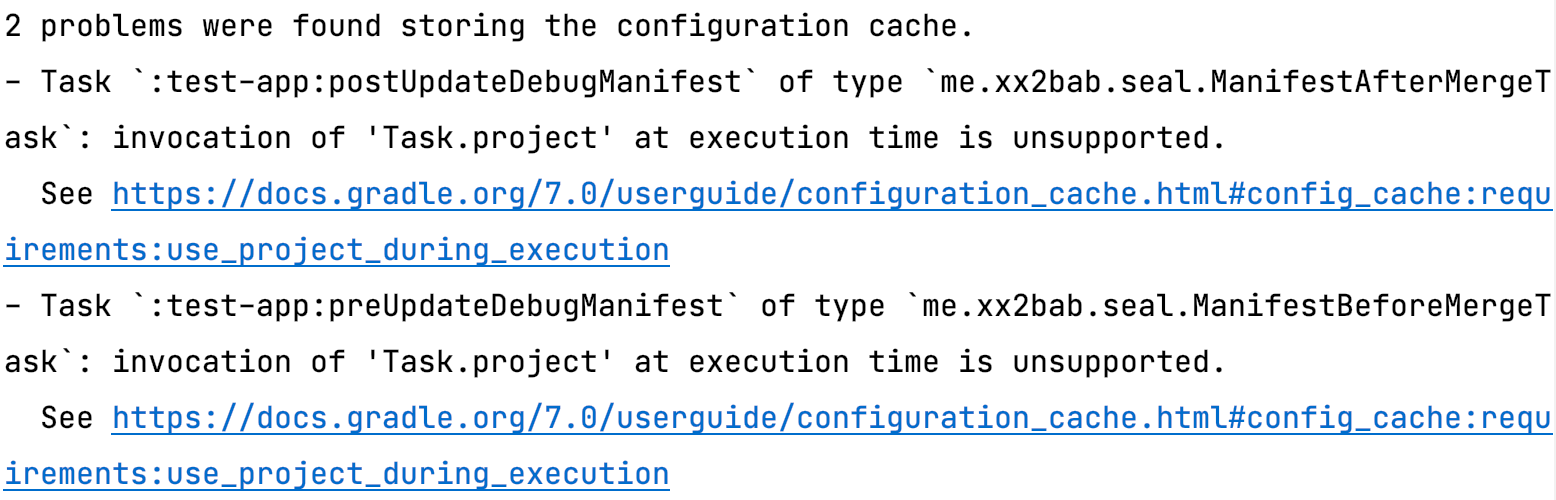
Through the Configuration Cache HTML Report output at the end of the build, we can view the detailed stack trace:
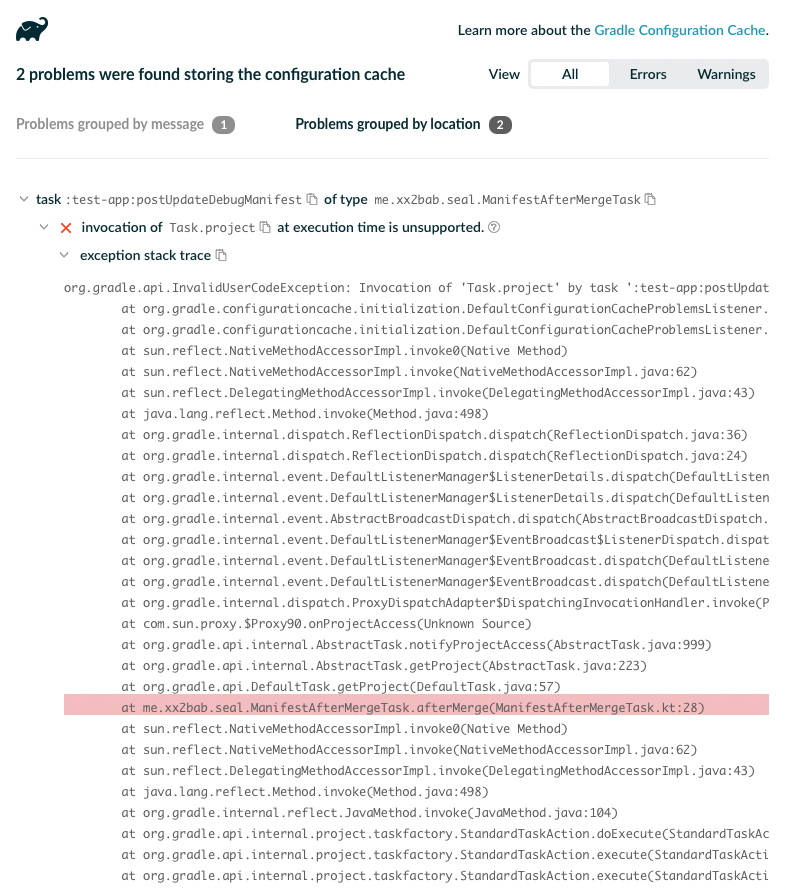
For this error, we simply need to change project.logger to a this.logger reference:
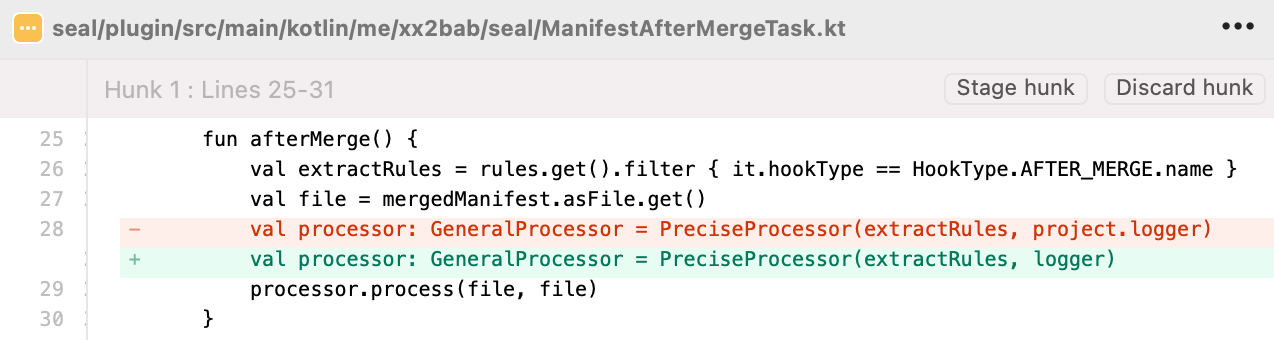
For more complex rules and use cases, refer to Gradle's documentation and AGP's journey to Configuration Cache compatibility (fixing over 400 issues):
Finally, there's an official Gradle-maintained android-cache-fix-gradle-plugin. For some special AGP build cache and configuration cache issues, you can check here - it might be exactly what your project encountered.
Non-transitive R-classes
In fact, R file features like this have been developing for many years. You can refer to this article organized in chronological order. However, the latest nonTransitiveAppRClass feature requires AGP 7.0 or above. Currently there's limited documentation, with partial mention in the Android Studio Arctic Fox release notes:
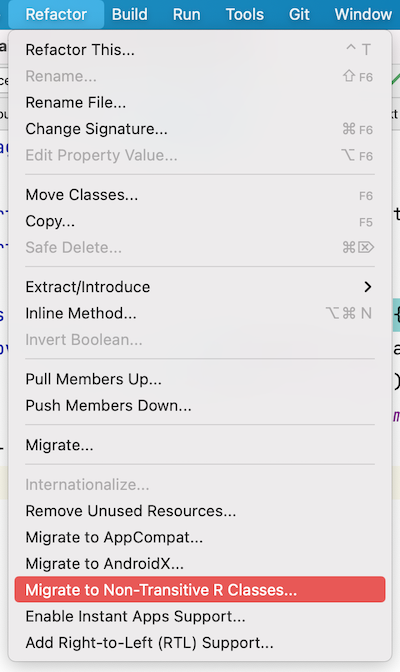
Non-transitive R class refactoring: Using non-transitive R classes in Android Gradle Plugin can bring faster build speeds for apps with multiple modules. It prevents resource duplication by ensuring that each module only contains references to its own resources without pulling references from dependencies. You can use this feature through Refactor > Migrate to Non-transitive R Classes.
Enable it as follows:
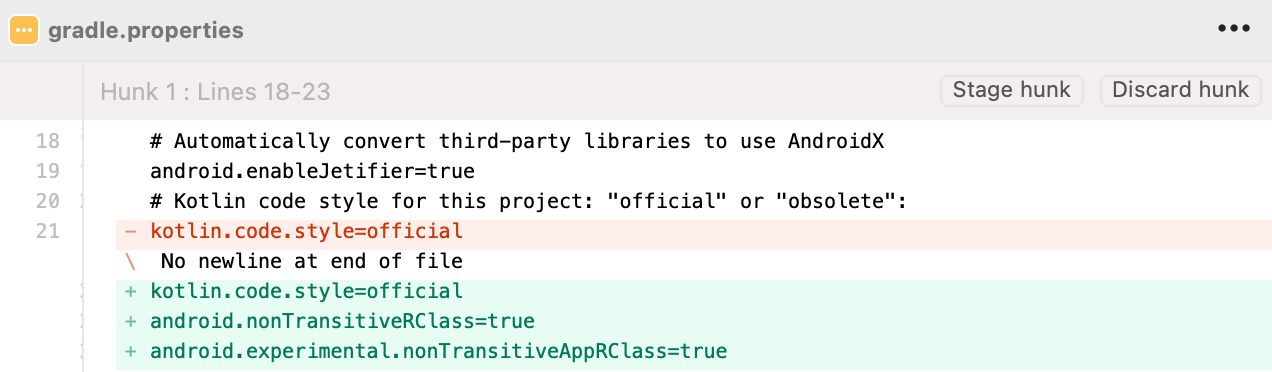
This operation helps you automatically add two lines of feature-enabling code to gradle.properties and rebuilds the project:
Cacheable Lint Task
Lint has always been a time-consuming task. After AGP 7.0 (originally planned for 3.5, see this document), it finally becomes a cacheable Task.
Others
Additionally, AS + AGP have had some improvement points since 4.x:
- Gradle Kotlin DSL experience and performance improvements - you can see the Google I/O Android App project has been completely converted to
*.gradle.ktsscripts; - AAPT2 performance improvements;
- Performance improvements from JDK 11;
- ...
You can find this information in the AGP/AS Release Notes.

New DSL
DSL Doc Migration to android.com
The old AGP DSL documentation hasn't been updated since 3.4. The new documentation has migrated to android.com, making it more unified. You can still view by version:
- Current Release: i.e., stable version 4.2;
- Preview Releases: i.e., beta 7.0 and alpha 7.1 test versions;
- Past Releases: all previous old versions, but due to transitions/switches in between, documentation for versions 3.5 -> 4.0 is actually missing;
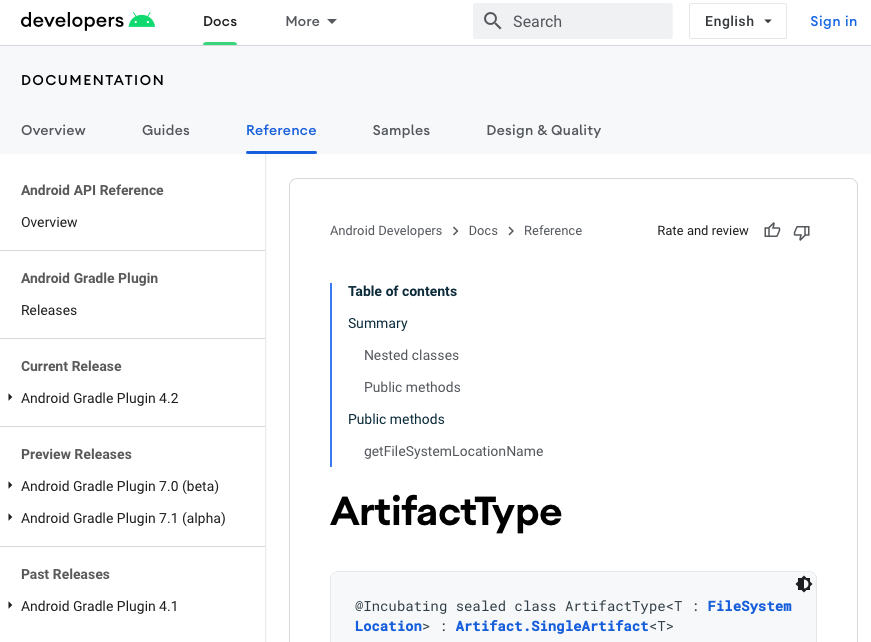
This change is also reflected in google source tags. For AGP source code, gradle-x.y.z tags no longer exist after 3.4. Currently you can use studio-x.y.z such as studio-4.2.0 to reverse-locate AGP versions.
AGP Upgrade Assistant Provided by Android Studio
To help developers upgrade AGP conveniently and smoothly, AGP in cooperation with AS has launched the upgrade assistant feature. This new feature has iterated through several versions and is currently very useful for upgrading Gradle Groovy DSL scripts. When you see an upgrade prompt (usually when first opening a project):

Clicking Upgrade will also have a preview function (screenshot from session slide):
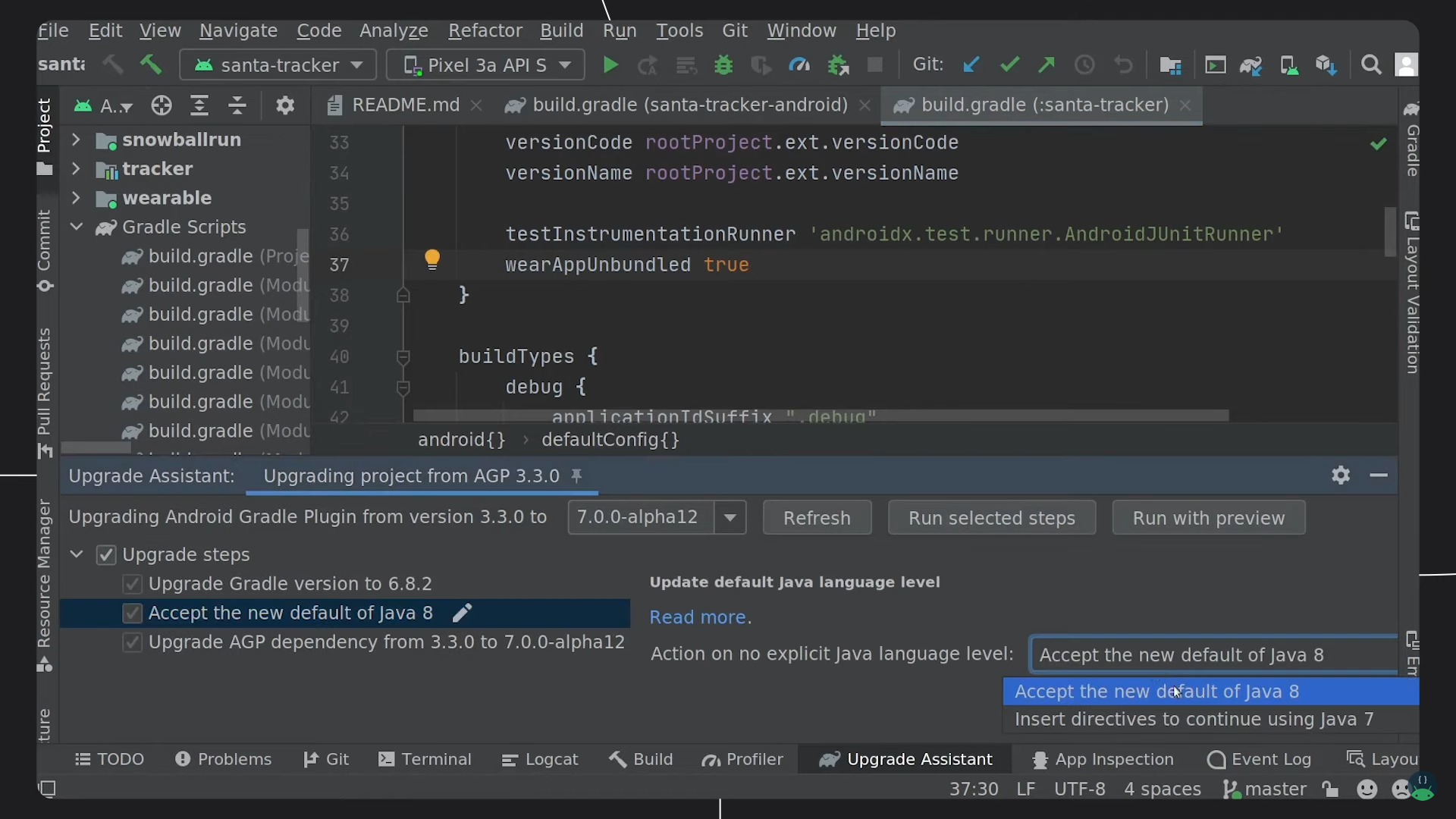
However, support for Gradle Kotlin DSL still needs to be completed. For example, migration of deprecated DSL like basic compileSdkVersion is not yet supported:
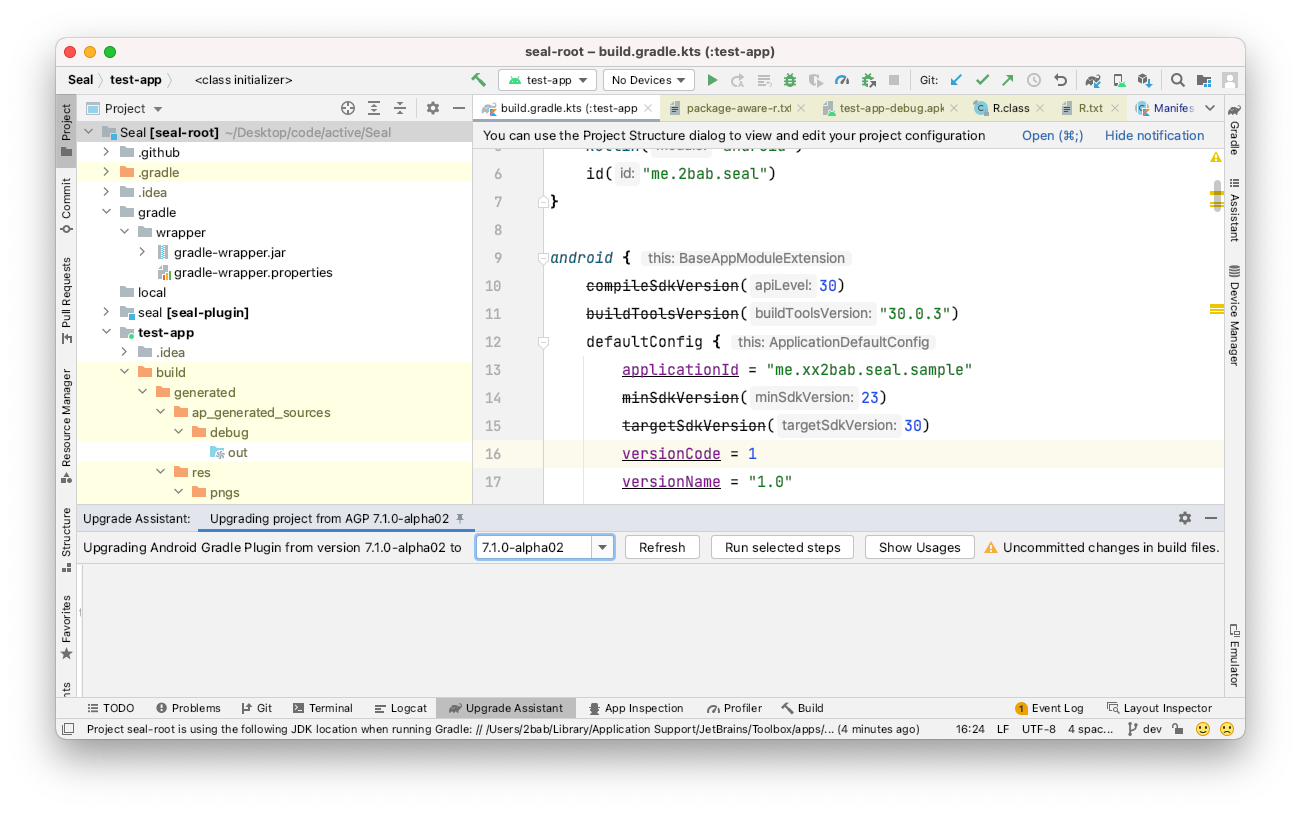
Of course, complex object references also cannot be directly modified for you, such as classpath(Deps.agp) - this is beyond the scope of what the tool can do. You can treat it as an auxiliary tool similar to Java to Kotlin conversion - first use it to quickly upgrade and organize basic DSL, then manually modify the small portions that have errors by referring to the DSL documentation.
New Variant API
Variant API is the most important update related to Android and plugin development in the past two years. For friends who haven't developed cooperative plugins for AGP before, you can understand "what is Variant" through the image below:
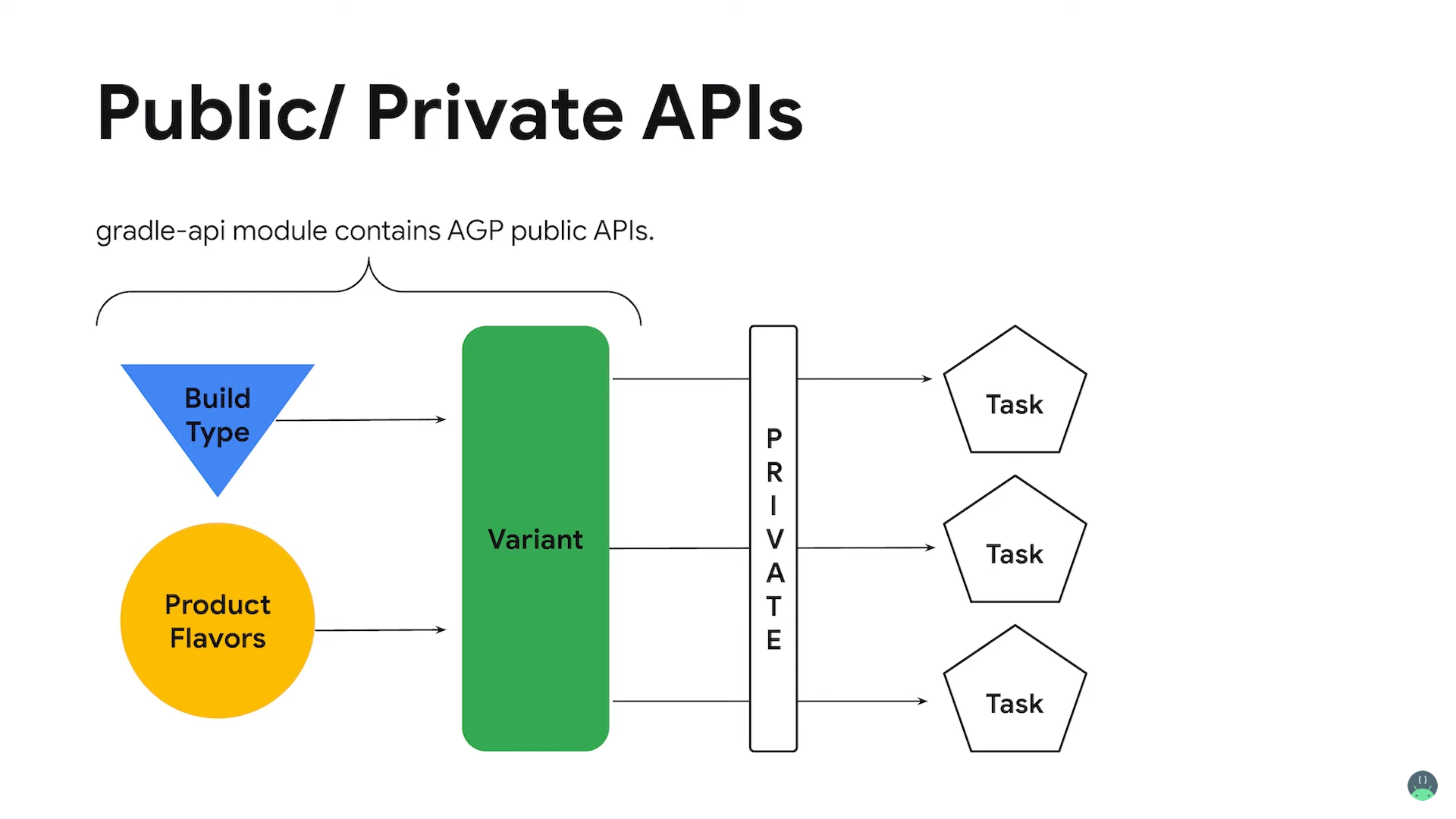
The Variant API update can be summarized as: To make cooperative plugin developers depend on more stable APIs, the original com.android.tools.build:gradle package has been split into gradle and gradle-api packages, achieving separation of interface and implementation. From a practical perspective, we can focus on two parts: Variant traversal entry changes and simplification of some custom Tasks.
Variant Traversal Entry Changes
Most AGP ecosystem cooperative plugins need to register Variant-aware Tasks, i.e., traverse Variants to register corresponding custom Tasks, such as the Seal plugin's postUpdateDebugManifest and postUpdateReleaseManifest mentioned above. You must have seen code like this (Groovy):
def android = project.extensions.android
android.applicationVariants.all { variant ->
    def variantName = variant.name.capitalize()
    createTask(project, variantName)
}
Or the Kotlin version:
val androidExtension = project.extensions.findByType(AppExtension::class.java)!!
androidExtension.applicationVariants.all { variant ->
    val variantName = variant.name.capitalize()
    createTask(project, variantName)
}
For plugins applicable to libraries, you need LibraryExtension and libraryVariants.
This type of API has now changed to new API calls within gradle-api:
val androidExtension = project.extensions.getByType<ApplicationAndroidComponentsExtension>()
androidExtension.onVariants { variant ->
    ...
}
The Variant obtained here is com.android.build.api.variant.ApplicationVariant, and the Extension comes from com.android.build.api.extension.ApplicationAndroidComponentsExtension. Another interface you might use is beforeVariants(...), used to control Variant building, such as globally modifying some Variant properties. From this Snippet we might not see the specific changes in Variant, but behind these changes are standardized Variant state transitions, public APIs, etc.
Simplification of Some Custom Tasks
This type of simplification refers to simplification of Task insertion points and Task parameter acquisition (injection). APIs providing such features are also called Artifact APIs. In the classic pattern: for insertion points, we generally manually find the Task's dependency relationships and use Gradle APIs to reorganize dependencies (you might even need to customize some new lifecycle anchor Tasks to assist); for Task parameters, various tricks are employed to find the data we need from existing Task parameters/intermediate products/private objects, then inject them into custom Tasks. Now Artifact APIs standardize a set of operations, enabling us to easily interact with existing data and intermediate products. From a practical perspective, we can divide into two patterns:
Complex Transform/Append/Create operations: one-stop service for inserting Tasks at specific nodes and Task parameter injection, generally suitable for needing to define a specific insertion point;
androidComponents {
    val gitVersionProvider = tasks.register<GitVersionTask>("gitVersionProvider") {
        gitVersionOutputFile.set(
            File(project.buildDir, "intermediates/gitVersionProvider/output"))
        outputs.upToDateWhen { false }
    }
    onVariants { variant ->
        val manifestProducer = tasks.register<ManifestProducerTask>("${variant.name}ManifestProducer") {
            gitInfoFile.set(gitVersionProvider.flatMap(GitVersionTask::gitVersionOutputFile))
        }
        variant.artifacts.use(manifestProducer)
            .wiredWith(ManifestProducerTask::outputManifest)
            .toCreate(SingleArtifact.MERGED_MANIFEST)
    }
}
Pure Get: actively obtaining intermediates, generally suitable for relatively independent Tasks without strict insertion position requirements (but there are implicit Task dependencies through Provider passing), without replacement operations needed:
androidComponents {
    onVariants { variant ->
        project.tasks.register<DisplayApksTask>("${variant.name}DisplayApks") {
            apkFolder.set(variant.artifacts.get(SingleArtifact.APK))
            builtArtifactsLoader.set(variant.artifacts.getBuiltArtifactsLoader())
        }
    }
}
More
From a practical perspective, the new Variant interface and Extension interface have fewer public APIs than before, but they're more standardized. Artifacts as a supplement to manually obtaining Task input/output currently has relatively few public APIs. I hope plugin developers will submit more issues to the AGP team when encountering reasonable APIs that should be public but aren't yet :).
Additionally, due to space limitations, I cannot introduce all Variant API updates here, including the introduction of new Provider<T> API (Lazy Configuration), Variant state transitions, more types of Artifacts API usage, how to learn from its design to solve those interfaces that haven't been encapsulated/exposed yet, etc. You can get more inspiration from these materials:
- From Gradle properties to AGP APIs - Android Dev Summit '19: Explains the cornerstone of Variant API —
Provider<T>API and its multiple derived subclasses, Variant state transitions and multiple usage patterns of its API; - New APIs in the Android Gradle Plugin - Android Developers Blog: Introduces the origin of Variant API design ideas and use of new APIs;
- android/gradle-recipes: Provides Groovy/Kotlin DSL sample code for common Variant API usage;
- Android Gradle Plugin DSL/API migration timeline: Milestones for New DSL and Variant API over the next three years;
- Lazy Configuration: Task configuration lazy acquisition,
Provider<T>and its various subclasses, Task implicit dependencies, etc.
New ASM API
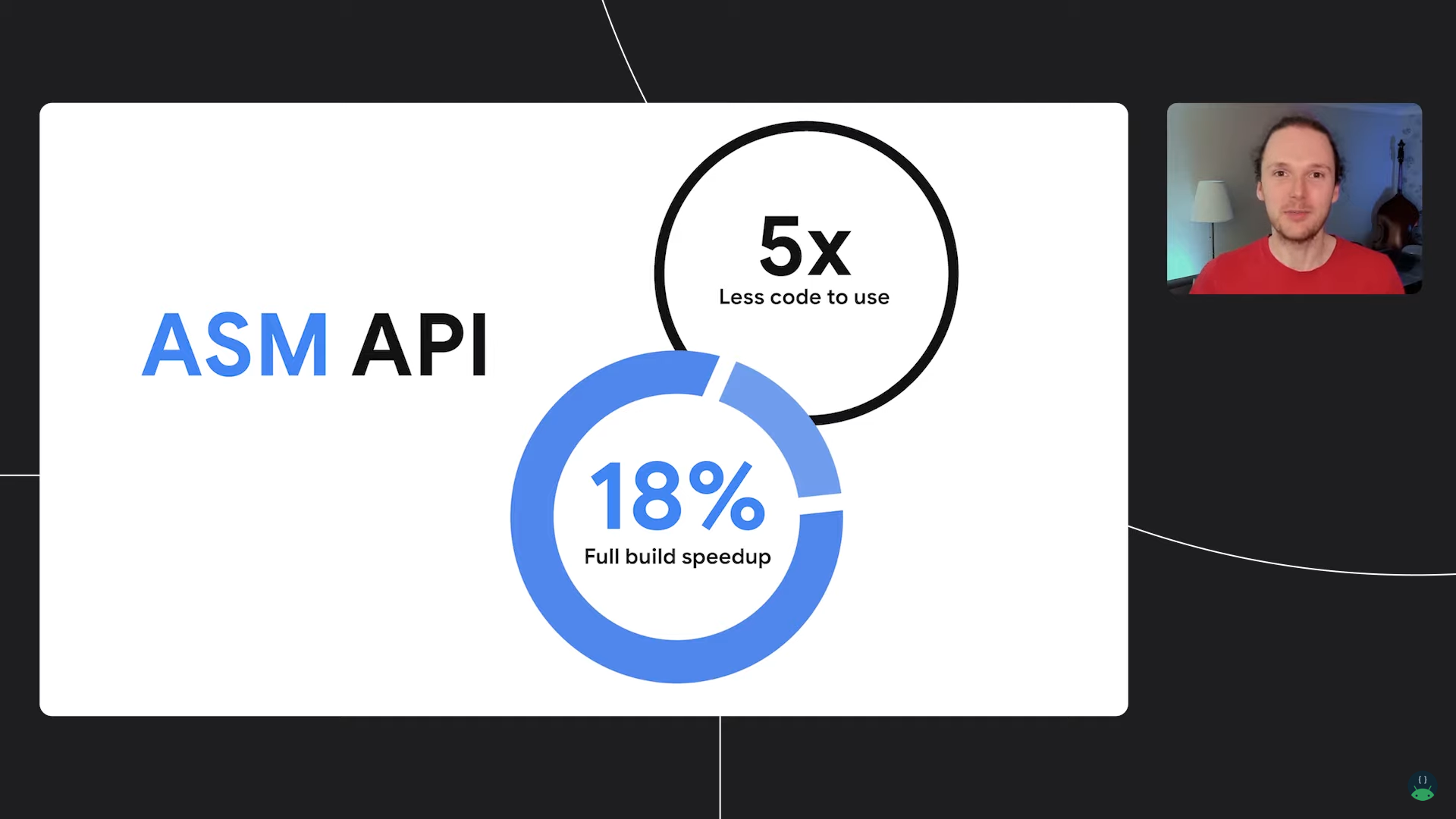
ASM API is a replacement for the previous Transform API, aimed at providing a lower-cost insertion point between Class -> Dex for modifying bytecode. It no longer has the flexibility of the previous Transform API - for example, it currently appears to be bound to the ASM bytecode tool and doesn't support Javassist or Aspect. However, at the same time, it has better performance, lower usage cost (referring to implementing the transform itself, because ASM is actually a lower-level API compared to Javassist and Aspect - more flexible but with higher learning cost), and easier adaptation to new Gradle features. It's currently just starting incubation. From the API Doc perspective, developers are not yet recommended to use it to build production environment plugins.
abstract class ExamplePlugin : Plugin<Project> {

    override fun apply(project: Project) {

        val androidComponents = project.extensions.getByType(AndroidComponentsExtension::class.java)

        androidComponents.onVariants { variant ->
            variant.transformClassesWith(ExampleClassVisitorFactory::class.java,
                                 InstrumentationScope.ALL) {
                it.writeToStdout.set(true)
            }
            variant.setAsmFramesComputationMode(FramesComputationMode.COPY_FRAMES)
        }
    }

    interface ExampleParams : InstrumentationParameters {
        @get:Input
        val writeToStdout: Property<Boolean>
    }

    abstract class ExampleClassVisitorFactory :
        AsmClassVisitorFactory<ExampleParams> {

        override fun createClassVisitor(
            classContext: ClassContext,
            nextClassVisitor: ClassVisitor
        ): ClassVisitor {
            return if (parameters.get().writeToStdout.get()) {
                TraceClassVisitor(nextClassVisitor, PrintWriter(System.out))
            } else {
                TraceClassVisitor(nextClassVisitor, PrintWriter(File("trace_out")))
            }
        }

        override fun isInstrumentable(classData: ClassData): Boolean {
            return classData.className.startsWith("com.example")
        }
    }
}
The APIs used in the code above can be referenced in these documents:
For friends unfamiliar with classic Transform, you can check out several well-known Transform library encapsulations (coincidentally all from Chinese companies' open-source projects):
Summary
From a developer's perspective, the Android Tools team is paying more attention to Engineering Experience in AGP & AS. While solving many legacy issues, this session also revealed long-term plans for building the AGP ecosystem. I hope to see these things truly accepted by more Android developers next year, and I'll definitely write another summary and outlook for 2022.