Build Guide #10 Android Development Tool Compatibility
"Build Guide" is a series of articles exploring Android build-related topics, covering Gradle, Android Gradle Plugin, Kotlin Script, and other tools, as well as their architectural applications. Discovering problems, solving problems, sharing new knowledge, and improving efficiency.
Due to my CPU burning out a few months ago, I was forced to switch to an M1 Mac Mini, so I rebuilt the entire development environment. Taking this opportunity, I want to organize the version matching strategies, compatibility, and performance on M1 chips for several basic tools. The discussions about version matching and compatibility are not limited to the current versions and platforms being used.
The versions mentioned below are:
- Zulu JDK: 11.0.11
- Kotlin: 1.5.21
- Gradle: 7.1.1
- Android Gradle Plugin (AGP): 7.0 & 7.1
- Android Studio: Arctic Fox 2020.3.1 & BumbleBee 2021.1.1 Canary 6
JDK
Starting from AGP 7.0, JDK 11 is the minimum requirement. JDK 11 has been an LTS (Long-term Support) version for nearly 3 years (Sep 2018), and has gone through 12 minor versions (11.0.12) of iteration, making it relatively mature now. For comparison, the previous LTS JDK 8 was released in 2014 and has accompanied us through 7 years and 300 minor version iterations. In fact, as Android developers, even if the project is primarily Java, the Language Level generally only targets 1.8 (some features from 9-12 are supported by D8, R8, and Android 11, 12 have incorporated them). Although Android officially says they won't abandon Java, support for Kotlin is indeed stronger in practice.
From this perspective, JDK 11 brings us more of:
- Performance upgrades at the Kotlin Compiler, Gradle, and IDE levels;
- Continued security assurance when JDK 8 stops maintenance (in 3 years);
- Adapting to the new release mechanism - a minor version every six months, an LTS major version every three years, reducing legacy baggage and running faster;
And I believe the JDK upgrade strategy should be:
- Conservative: If you don't care about new language features, you can decide the JDK version based on the annual AGP upgrade, since IDE generally bundles a JDK, Kotlin compiler, Gradle keeps up with the latest JDK and has good backward compatibility - so based on the barrel principle, just wait for AGP to upgrade first. Currently it looks like AGP may only follow relatively stable LTS versions;
- Aggressive: Test after Gradle supports it;
On M1 Mac, since Oracle doesn't have an ARM64 version yet, the current mainstream approach is to install Zulu JDK11 maintained by Azul.
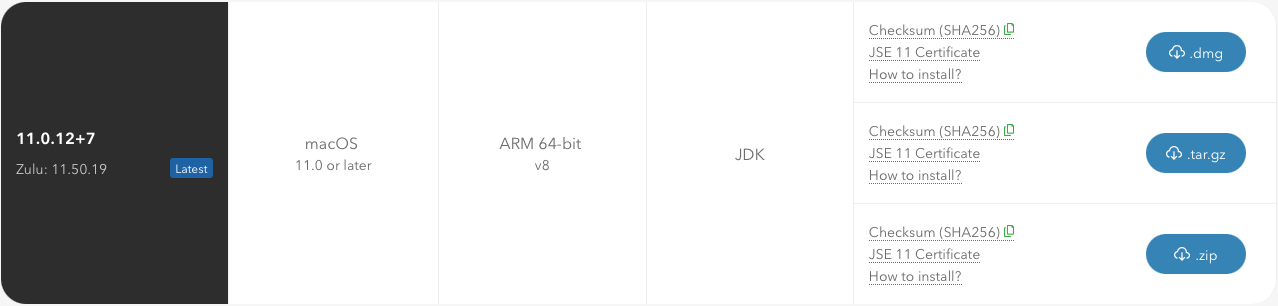
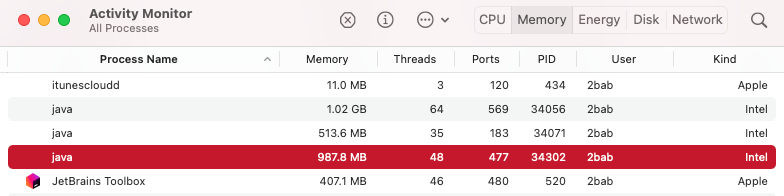
Note that the commonly used JDK management tool SDKMAN! in my testing still runs under Rosetta 2 translation. This causes even if you install Zulu JDK11, starting through SDKMAN! scripts will still show Gradle java processes running under Intel ABI. So currently it's recommended to download and install from the official website, and consider switching after supporting tools are ready.
Kotlin
Kotlin version matching has relatively few restrictions. Generally I consider three points:
- Are there particularly attractive new features, such as newly released stable versions of Coroutine, Flow, or better support for new versions of Kotlin Multiplatform Mobile;
- Whether to use the first version of a major iteration, such as observing the just-released
1.4.0,1.5.0- this actually applies broadly to various Libraries; - The Kotlin version currently bundled/tested by Gradle, e.g., the latest 7.1.1 stable still uses Kotlin
1.4.31(7.2 RC jumps to1.5.21);
Regarding the last point, if the Kotlin version used is inconsistent with what Gradle bundles, you'll see this Warning:
w: Runtime JAR files in the classpath should have the same version. These files were found in the classpath: ... /Users/2bab/.gradle/caches/modules-2/files-2.1/org.jetbrains.kotlin/kotlin-stdlib-jdk7/1.4.31/84ce8e85f6e84270b2b501d44e9f0ba6ff64fa71/kotlin-stdlib-jdk7-1.4.31.jar (version 1.4) /Users/2bab/.gradle/caches/modules-2/files-2.1/org.jetbrains.kotlin/kotlin-stdlib/1.5.21/2f537cad7e9eeb9da73738c8812e1e4cf9b62e4e/kotlin-stdlib-1.5.21.jar (version 1.5) /Users/2bab/.gradle/caches/modules-2/files-2.1/org.jetbrains.kotlin/kotlin-stdlib-common/1.5.21/cc8bf3586fd2ebcf234058b9440bb406e62dfacb/kotlin-stdlib-common-1.5.21.jar (version 1.5) w: Consider providing an explicit dependency on kotlin-reflect 1.5 to prevent strange errors w: Some runtime JAR files in the classpath have an incompatible version. Consider removing them from the
Let's look at a simple example of how the problem occurs:
plugins {
    id("com.android.application")
    // No version specified, using Gradle's bundled version,
    // Gradle 7.1.1 corresponds to Kotlin 1.4.31's various libraries and compilation tools
    kotlin("android")
}

dependencies {
    // But here we use the latest 1.5.21 Kotlin, causing the above problem
    implementation("org.jetbrains.kotlin:kotlin-stdlib:1.5.21")
}
The solution is also simple:
plugins {
    id("com.android.application")
    // Manually specify the version
    kotlin("android") version "1.5.21"
}
The official Kotlin documentation directly demonstrates the writing with version number. However, this version is Kotlin tested based on Gradle, but Gradle itself hasn't tested and packaged it yet (see the image in the Gradle section). If problems occur, they may be difficult to solve:
So my recommended upgrade strategy is:
- Conservative: Wait until Gradle upgrades to upgrade. For example, from 1.5.0 to 1.5.21 was only two months apart, and Gradle followed up;
- Aggressive: Upgrade when there are practical new features or the first patch version after a major iteration.
Gradle
Previously I mentioned that Kotlin's official documentation explains various compatibility situations with Gradle. Conversely, Gradle also has a support document indicating support for various languages and platforms including Java, Kotlin, Android, etc.
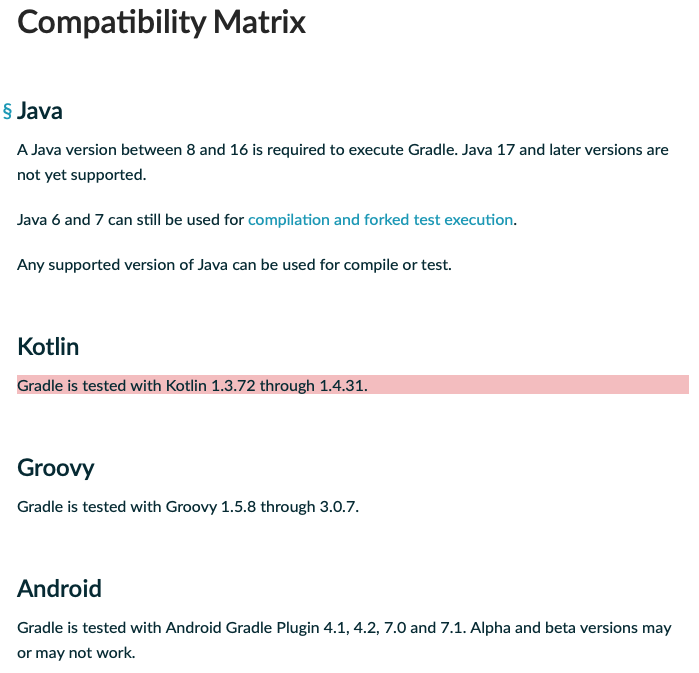
Like the Java version support and Kotlin version support mentioned earlier, you can see everything at a glance here. Except that Kotlin support lags by a month or two, compatibility with the latest versions of other tools is not a problem. Gradle's own backward compatibility I think is quite good - I basically upgrade every version. But the upper-level AGP DSL, especially older versions, often has major changes (fortunately it's much better after 7.0).
So my recommended upgrade strategy is:
- Conservative: Upgrade according to AGP's documentation at minimum version (see image below). For example, AGP 4.2.0+ corresponds to Gradle 6.7.1+;
- Aggressive: Upgrade every patch version (x.y.1/2/3) or every version (Gradle doesn't have a -betaX version habit, usually just Nightly and RC).
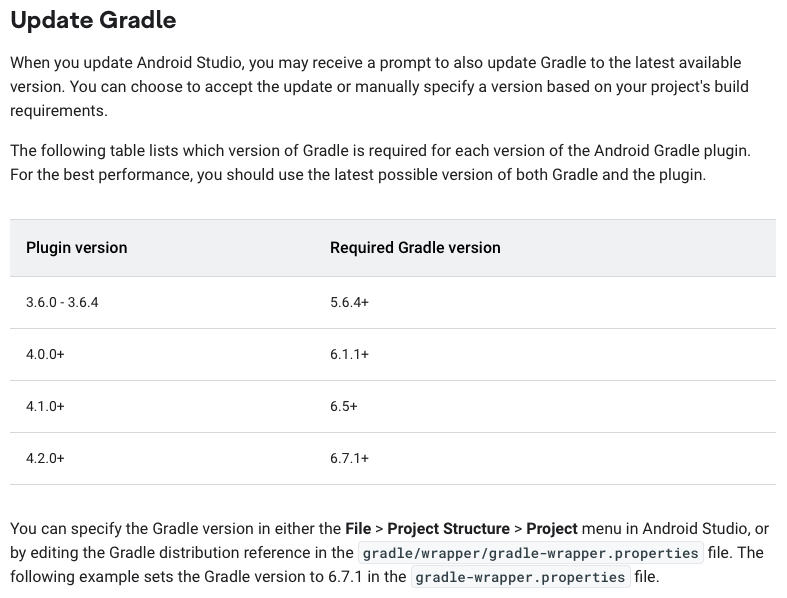
Additionally, Gradle 7.0 and later natively supports M1, and my personal experience has been quite good.
Android Gradle Plugin
We've basically covered AGP version matching restrictions earlier. Taking 7.0 as an example, let's look at the official Release Note compatibility description:
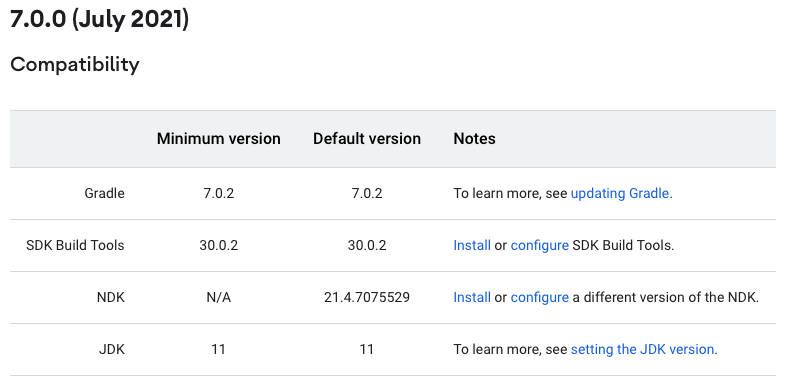
One additional point: Starting from AGP 7.0, its version will sync with Gradle's major version, strictly following the Semantic Versioning system (previously it synced with AS's version). That is, AGP 7.x will adapt to Gradle 7.x versions. However, AGP's release time is still together with AS, and currently it looks like its alpha/beta numbers follow AS, so actually the three have formed some kind of tacit synchronization mechanism.
So my recommended upgrade strategy is:
- Conservative: Upgrade with AS stable releases (or appropriately skip the first major version iteration);
- Aggressive: Upgrade every version, or start upgrading from alpha/beta, such as for Gradle plugin adaptation.
Android Studio
AS basically has no matching restrictions. As long as you're using a previous stable version of AGP, AS can be backward compatible. My recommended upgrade strategy is:
- Conservative: Appropriately skip the first major version iteration;
- Aggressive: Upgrade every version, or start upgrading from alpha/beta, such as for IDE plugin adaptation or needs for new features like Compose, debugging tools, etc.
Additionally, since AS is based on secondary development of IDEA Community Edition, overall stability and speed of new feature support are not as good as IDEA Ultimate. For example, Gradle's nested Composite Build is currently not in AS's supported scope, see this issue.
Finally, starting from Arctic Fox 2020.3.1, AS natively supports M1, but for a smoother experience, I think BumbleBee 2021.1.1 Canary is better.
IDEA
IDEA's main matching restrictions come from Android Plugin (Android IDE plugin) version adaptation. Generally speaking, after a new stable version of AS is released, the next stable version of IDEA will come with the new plugin version, thus supporting Android development including AGP.
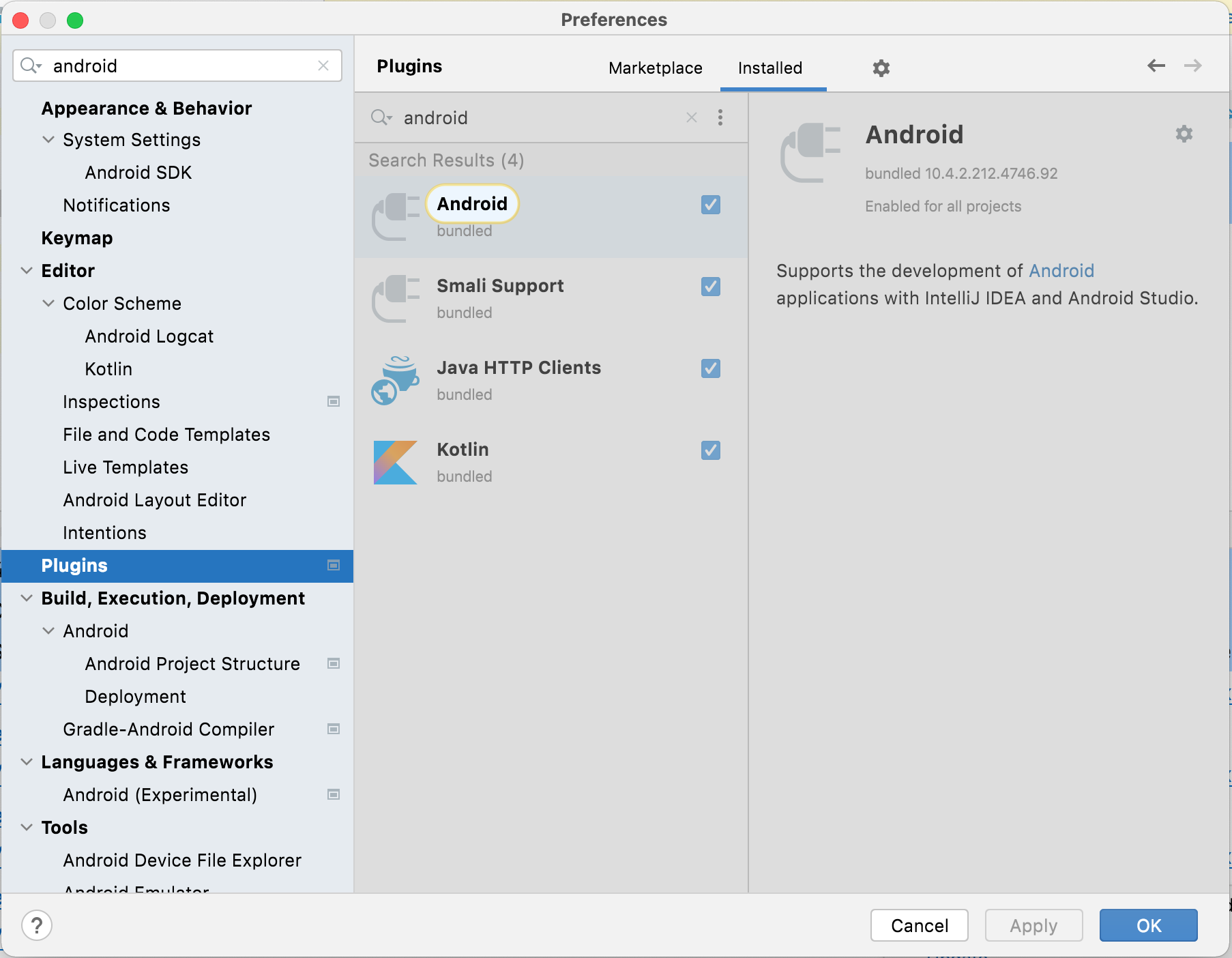
Occasionally there are longer waits. For example, this year AS&AGP 4.2 was released in April, but it wasn't until July when IDEA 2021.2 was released that the Android Plugin was updated. The official explanation was that Google released AGP 4.2 source code late, missing the 2021.1 version.
My recommended upgrade strategy is:
- Conservative: Only upgrade stable versions;
- Aggressive: Start upgrading from EAP or RC, such as for better Kotlin support, earlier AGP support, and M1 platform optimizations.
Finally, 2021.2 is also the version that made me feel there's no longer any lag on M1.
Summary
I personally use the M1 platform + adapt some Gradle Plugins, so I often use beta or even alpha AGP (as a Runtime library), and developing with the latest IDEA Ultimate is quite smooth.
For company projects, at this stage on x86 platforms I think you can use the following configuration, adjusting corresponding tool versions for ARM M1 based on the above:
- JDK 11 (will have to upgrade sooner or later since AGP upgraded)
- Gradle 7.1.1 (can upgrade after 7.2 supports 1.5.21)
- Kotlin 1.4.31
- AGP 4.2.2 (7.0 stabilized the new Variant API, soon 7.1 will also stabilize the new DSL, can wait and see if you don't need Compose)
- AS 4.2.2 (can wait and see if you don't need Compose)
- IDEA 2021.2