Build Guide #11 BundleTool Gradle Plugin
App Bundle (.aab) as the officially promoted new delivery format for Android has been around for a while. This year's PlayStore policy mandating that "all new apps must use .aab" for submission has become a major driver for everyone to make the switch. Making your app compatible with and packaging into .aab format is not complicated - simply add the corresponding DSL configuration and replace the packaging command with bundle${VariantName}. However, the .aab obtained after packaging cannot be directly installed on debugging devices using adb locally. You need to use bundletool to convert it to .apks before calling its install command to install.
Common Scenarios
The BundleTool official documentation lists various uses of CLI commands. In more complex environments, you might have encountered these scenarios with BundleTool:
- During local testing, you need to manually run conversion and installation commands using BundleTool's CLI;
- In CI environments, you need to configure the BundleTool CLI tool, then write some Shell scripts to control the post-packaging conversion process;
- Real device labs, cloud device testing platforms need to integrate BundleTool into corresponding tests, making it convenient to generate apks packages for specific device models.
These scenarios often come with the following issues:
- Some internal test package distribution channels don't support aab and apks. We need to do quick functional tests on these non-GP, non-real-device-lab platforms where universal apk is the best choice for such scenarios (but packaging a new apk from scratch is obviously a waste of resources);
- After uploading the aab package to GP's Console, you can clearly see the estimated download size for all supported devices, but this data metric is not convenient to collect and quantify on CI using Shell scripts (though it might be possible with some effort or Python);
- AGP actually integrates the BundleTool package, so having to configure BundleTool's CLI separately each time seems somewhat redundant.
This made me wonder: AGP has BundleTool as a dependency - doesn't it have these subsequent BundleTool conversion Tasks? Wouldn't using Gradle for these subsequent operations actually be more suitable?
Deep Dive into AGP & BundleTool
If we open the IDE's Gradle Task list and search for the "Bundle" keyword, we'll easily find tasks like makeApkFromBundleForXxxx etc. Their implementation is the com.android.build.gradle.internal.tasks.BundleToApkTask class.
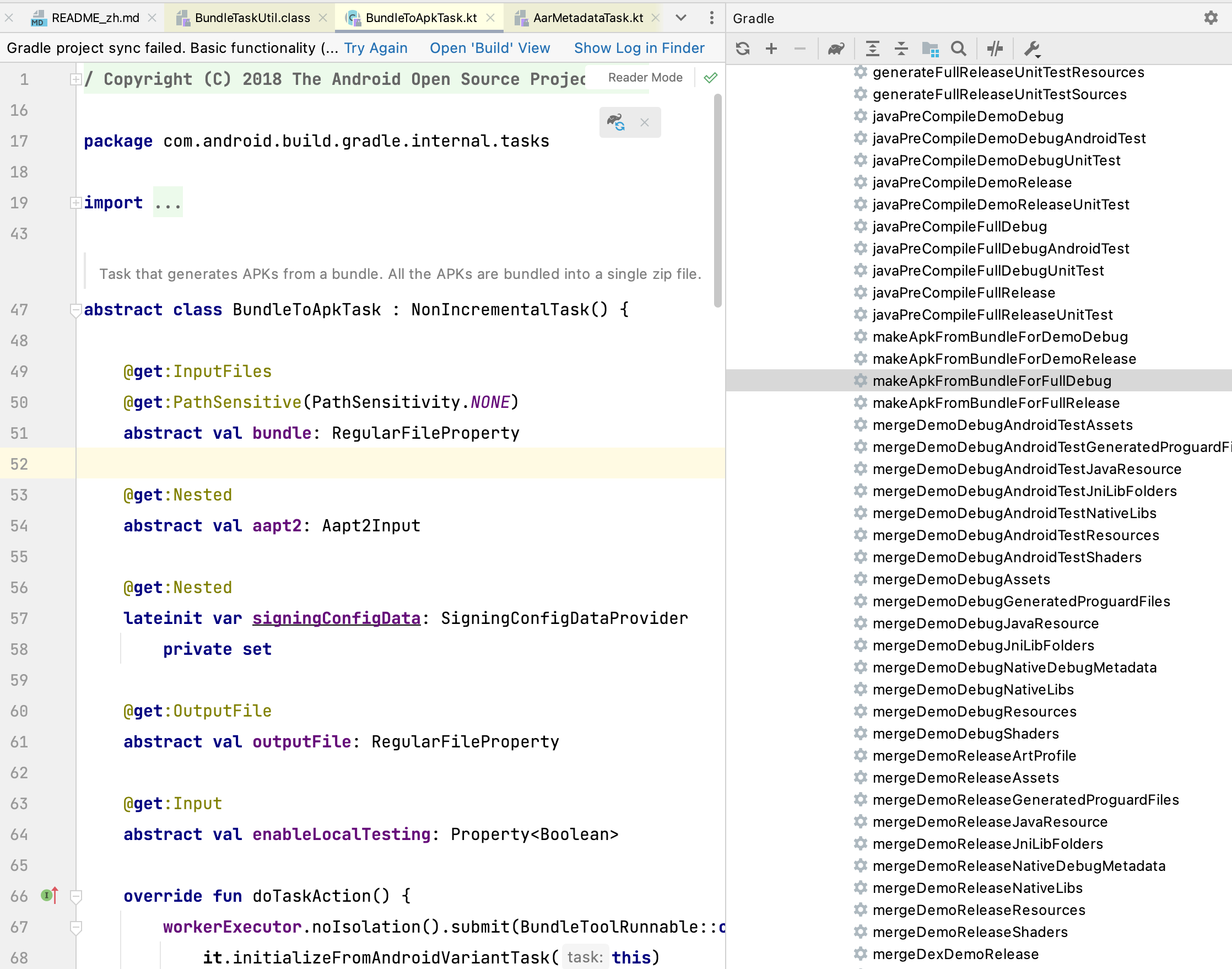
When checking the associated usage of this class in the source code, you'll find that besides registration, there's no trace of this class being used anywhere else. And the specific role of this task itself is actually just:
- Depends on
PackageXxxBundle, waiting for it to produce an unsigned Bundle; - Inputs the Bundle from the previous step, executes the
BuildApksCommandcommand from the BundleTool package to produce an .apks package. - From its input parameters, you can see that the only configuration it actually exposes to users is
enableLocalTesting, while everything else uses the default values of BundleTool'sbuild-apkscommand; - From its output result (see below), you'll discover it's actually just an "intermediate product" (located in the
/intermediatesfolder), not a final product.
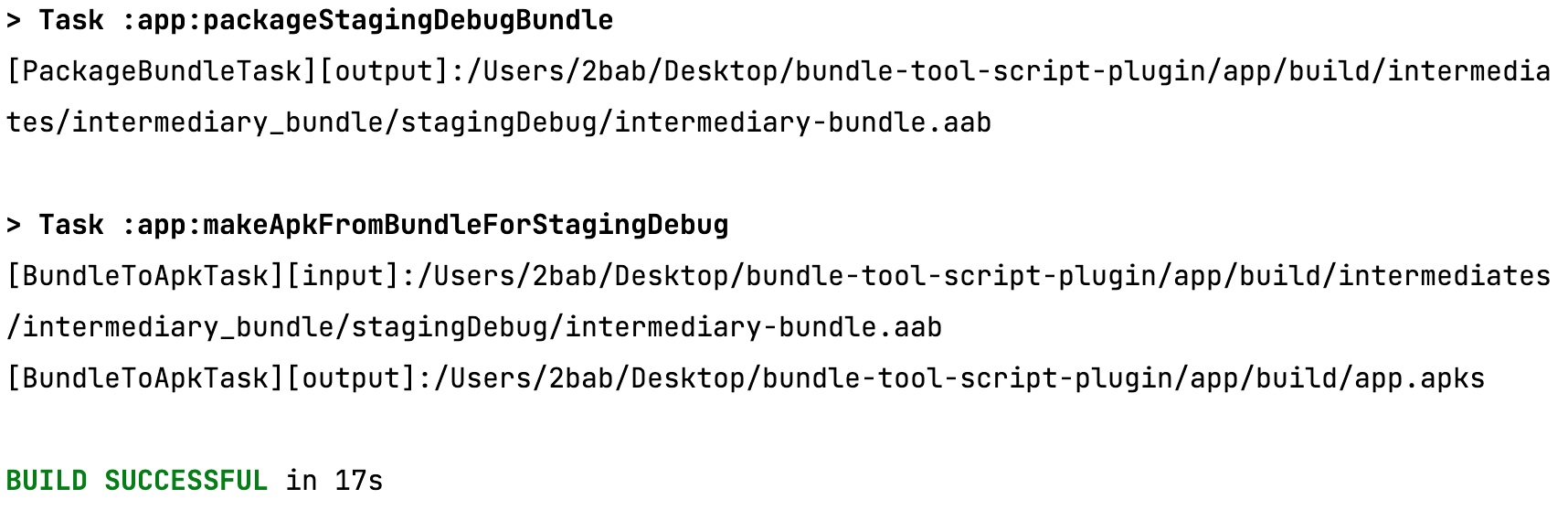
This is a bit like "food that's tasteless but a pity to throw away": there's an existing Task but its usage scope is very limited. Why not... wrap our own Gradle Plugin using the BundleTool library?
How to Wrap bundle-tool-gradle-plugin?
After simple analysis of BundleTool's several commands, we found their dependency relationships as follows:
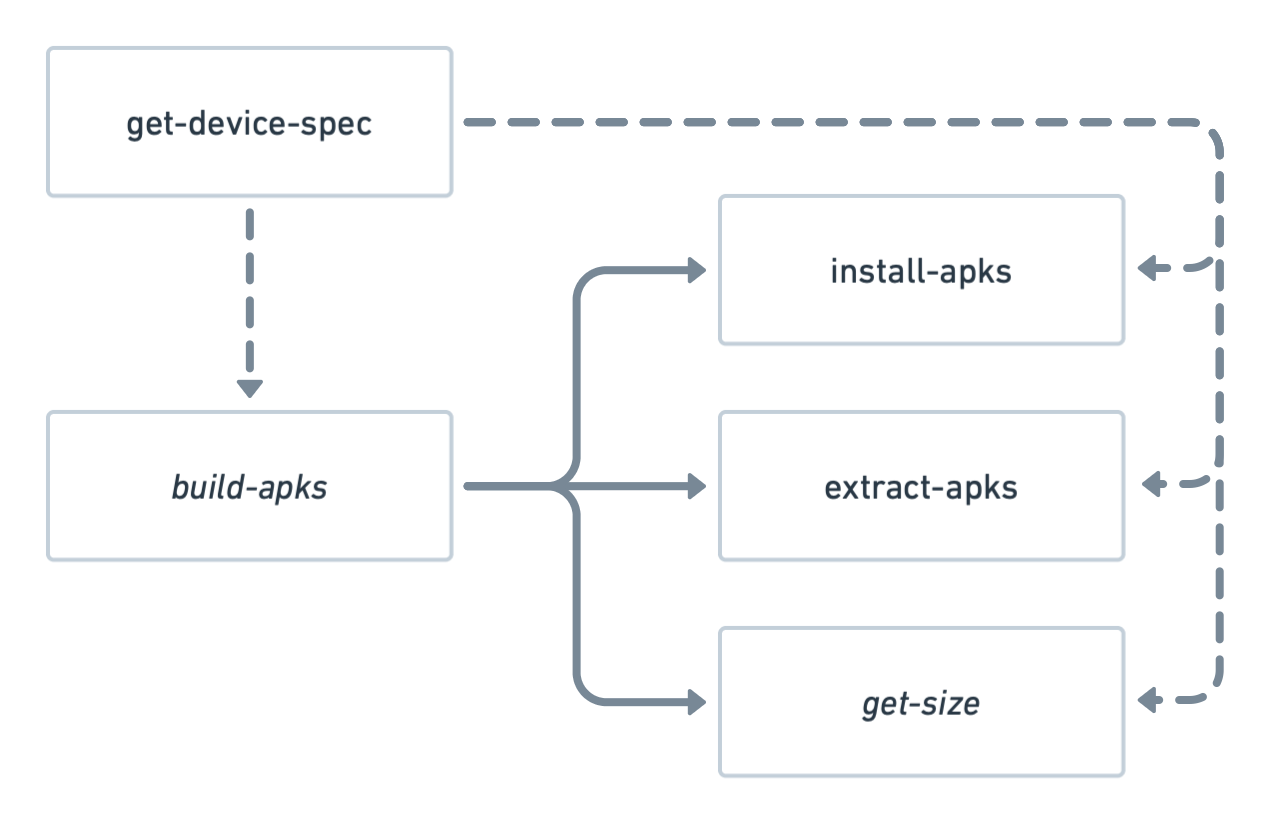
Among them:
- In terms of sequence,
build-apksis a required prerequisite task (solid line) for the other commands, andget-device-specis an optional prerequisite task (dashed line) for several commands. - In terms of interaction,
build-apksandget-size(italicized parts) are closely related to the build process and don't require test devices; other commands require test devices. get-device-specexporting json files is a one-time task, we can assume this part is already complete;
Thus, our involved domain is also clear: build-apks and get-size commands that are directly related to final products. install-apks and extract-apks can be completed locally using CLI based on the current device, and in CI or cloud testing platforms there are usually dedicated scripts to handle them in combination with BundleTool.
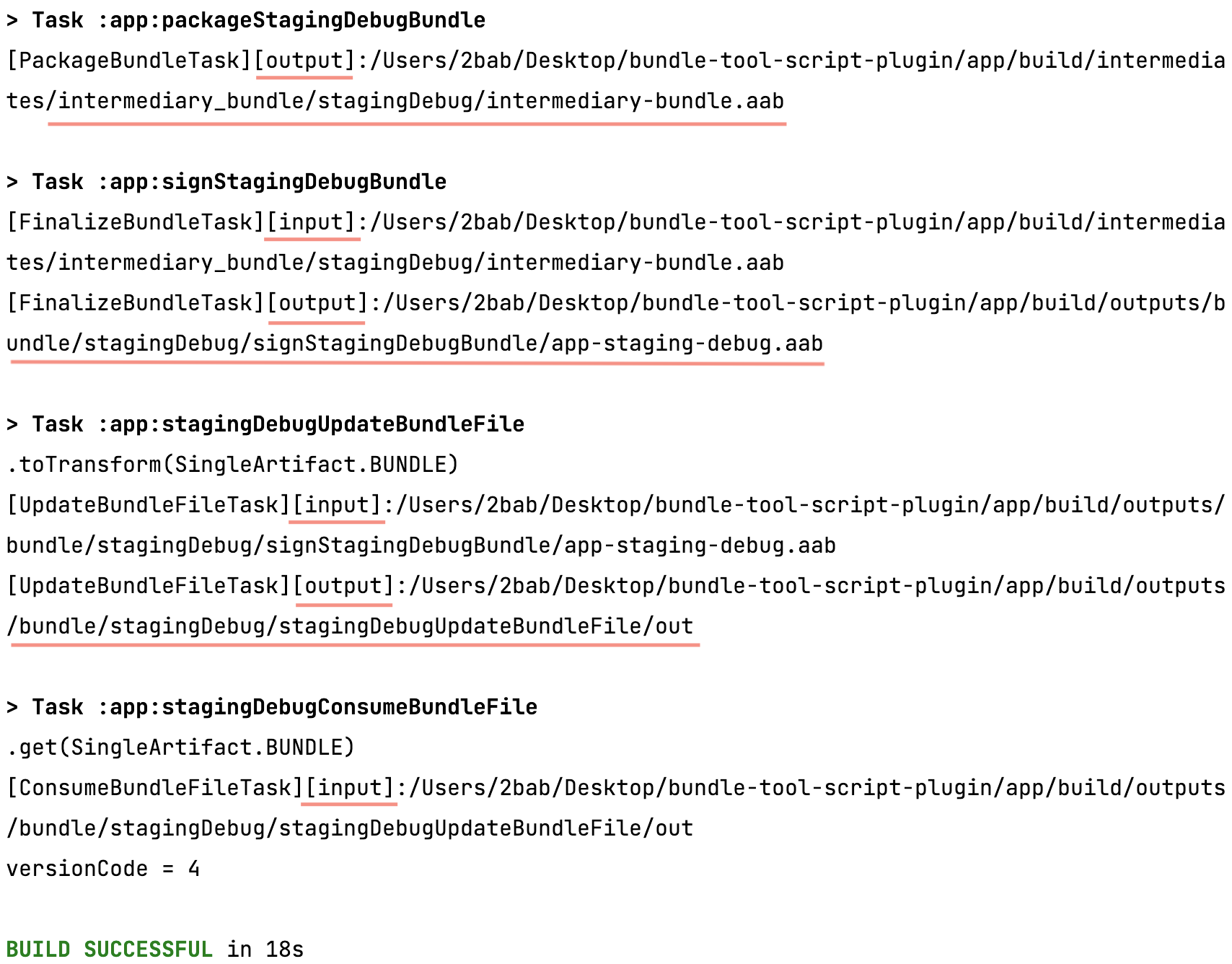
Then we consider how to get and modify the final output Bundle. The new Variant API actually already provides convenient methods to modify and get the final Bundle. The entire process can refer to the running screenshot below. You can see that compared to the previous intermediate product mode, Variant API products are all output to the /outputs folder now. Since we don't need the intermediate aab, we just need to simply call variants.get(SingleArtifact.BUNDLE), pass the obtained .aab file to a custom Task, and then borrow from AGP's code to wrap various commands:
// A simple Task to verify the idea. The complete plugin implementation is more complex than this. Please refer to the repository link at the end
abstract class ConsumeBundleFileTask : DefaultTask() {

    @get:InputFiles
    abstract val finalBundleProperty: RegularFileProperty

    @get:Internal
    abstract val buildToolInfo: Property<BuildToolInfo>

    @get:Nested
    lateinit var signingConfigData: SigningConfigDataProvider

    @get:OutputFile
    abstract val apksFileProperty: RegularFileProperty

    @TaskAction
    fun taskAction() {
        val aapt2Path = buildToolInfo.get().getPath(BuildToolInfo.PathId.AAPT2)
        println(".get(SingleArtifact.BUNDLE)")
        println("[ConsumeBundleFileTask][input]:" + finalBundleProperty.asFile.get().absolutePath)
        println("[ConsumeBundleFileTask][output]:" + apksFileProperty.asFile.get().absolutePath)
        val signingConfigData = signingConfigData.resolve()!!
        val command = BuildApksCommand.builder()
            .setBundlePath(finalBundleProperty.asFile.get().toPath())
            .setOutputFile(apksFileProperty.asFile.get().toPath())
            .setAapt2Command(
                Aapt2Command.createFromExecutablePath(
                    File(aapt2Path).toPath()
                )
            )
            .setSigningConfiguration2(
                keystoreFile = signingConfigData.storeFile,
                keystorePassword = signingConfigData.storePassword,
                keyAlias = signingConfigData.keyAlias,
                keyPassword = signingConfigData.keyPassword
            ).setLocalTestingMode(false)
        command.build().execute()
    }
    ...
}
Friends unfamiliar with the new Variant API can refer to my sharing this month at GDG community "Extend Android Build Process - Based on New Variant/Artifact APIs" (replay).
Finally, let's briefly look at BundleTool's BuildApksCommand.Builder. This Builder's setXxx-related APIs have only had two minor changes in the past year, one of which was a new method addition that doesn't really affect original compatibility - it's relatively stable compared to AGP.
At this point, the theoretical construction cost and maintenance cost of the entire plugin are within acceptable range.
Using the Plugin
The plugin development is no different from several others I've written before. Let's look directly at plugin usage.
0x01. Add the plugin to classpath:
buildscript {
    repositories {
        ...
        mavenCentral()
    }
    dependencies {
        classpath("com.android.tools.build:gradle:7.0.4")
        classpath("me.2bab:bundle-tool-plugin:1.1.0")
    }
}
0x02. Apply Plugin:
// For your application module
plugins {
    id("me.2bab.bundletool")
}
0x03. Advanced Configurations
import me.xx2bab.bundletool.*

bundleTool {
    // This is a very interesting configuration item - it can enable/disable
    // plugin features by different variant channels. For example, here we disable
    // the debug + GET_SIZE feature combination.
    // You can adjust and enable needed features according to your project's actual buildtypes and flavors.
    enableByVariant { variant, feature ->
        !(variant.name.contains("debug", true) && feature == BundleToolFeature.GET_SIZE)
    }

    // Each configuration item corresponds to a `build-apks` command execution
    buildApks {
        create("universal") {
            buildMode.set(ApkBuildMode.UNIVERSAL.name)
        }
        create("pixel4a") {
            deviceSpec.set(file("./pixel4a.json"))
        }
    }

    // Each configuration item will calculate the size of all apks output from `buildApks` above in sequence.
    // With the current configuration, it will output 2 * 1 = 2 csv files
    getSize {
        create("all") {
            dimensions.addAll(
                GetSizeDimension.SDK.name,
                GetSizeDimension.ABI.name,
                GetSizeDimension.SCREEN_DENSITY.name,
                GetSizeDimension.LANGUAGE.name)
        }
    }
}
0x04. Build your App and Enjoy!
# Make sure the Variant in the command is allowed in `enableByVariant`
./gradlew TransformApksFromBundleForProductionRelease
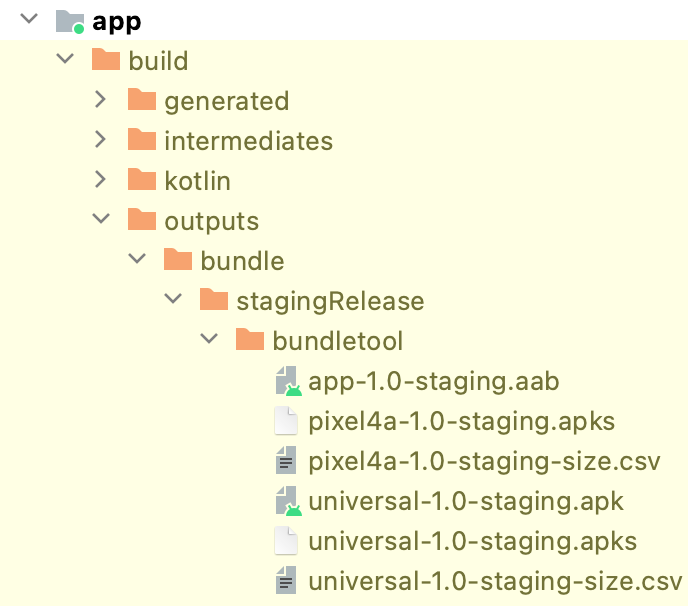
Finally, you can find the output results in /app/outputs/bundle/${variantName}/bundletool.
Summary
I hope this small tool can help everyone when integrating the new Android Bundle. The plugin is open-sourced on my Github: bundle-tool-gradle-plugin. For the idea of enabling/disabling plugin features by Variant, please refer to the next Build Guide #12.