Build Guide #12 Enabling Plugin Features Based on Variant
Anyone who has used third-party Gradle plugins in Android development should have encountered this problem: I only want to apply this plugin in certain buildTypes or flavors, but I can't find a suitable way.
The root cause of this problem is that Variant (buildType + flavor) is not a Gradle concept, but comes from Android Gradle Plugin (AGP)'s multi-channel configuration. So from Gradle's platform perspective, it's difficult to provide convenient support upward: plugin introduction within a project is global and platform-level, not changed by the will of any particular plugin (AGP).
OK, but our problem still needs to be solved, hence the four solutions below (fog). We'll explain the ideas in order from ineffective to highly effective.
Applying Plugins Based on Variant (Ineffective X)
flavorDimensions += "server"
productFlavors {
    ...
    create("production") {
        dimension = "server"
        applicationIdSuffix = ".production"
        versionNameSuffix = "-production"
        versionCode = 2
        apply("xxx") // Ineffective
    }
}
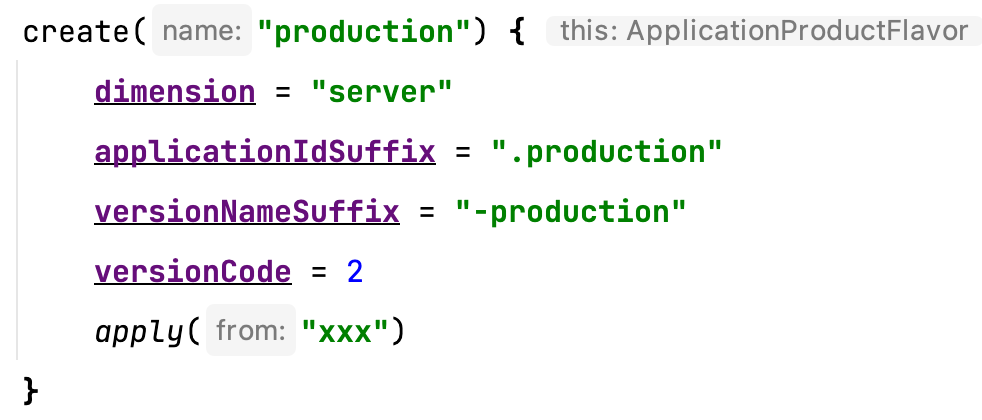
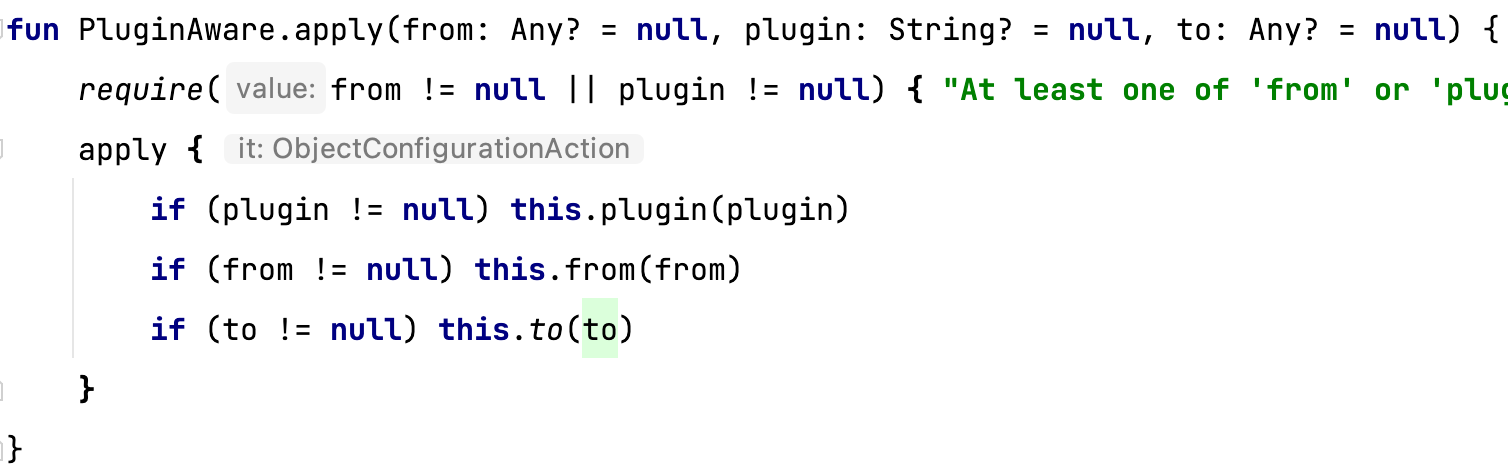
Many Android or Gradle beginners think, can't I just put apply(...) here? (Of course, you can't use plugins { id("xxx") }). The misconception here is that the apply(...) method has no association with the current context object:
- The closure context of
create("..."){}isthis:ApplicationProductFlavor. apply(...)is an extension method mounted on PluginAware (inbuild.gradle.kts), acting on the entire Project, so your plugin will still be introduced globally.
A similar classic misconception:
create("production") {
    dimension = "server"
    applicationIdSuffix = ".production"
    versionNameSuffix = "-production"
    versionCode = 2
    packagingOptions {
        jniLibs {
            excludes.add("...")
        }
    }
}
You might think this sets separate packagingOptions for this flavor, but actually this method is a method of the CommonExtension interface, not belonging to ApplicationProductFlavor. That is, it sets for the entire Android Gradle Plugin, not a single flavor. If you make different settings in each flavor, the last setting will override all previous ones. For solutions to this problem, refer to the "Secondary Configuration" section in my previous GDG sharing.
Applying Plugins Based on Command (Partially Effective X)
The problem we're discussing can also be found in some StackOverflow Q&As, with many answers about "parsing the entered command" for judgment.
if (gradle.startParameter.taskRequests.toString().contains("production")) {
    apply(...)
}
This approach can solve situations where your entered command is ./gradlew clean assembleProductionRelease etc., because such commands only contain information for one Variant (i.e., Production + Release). However, if the entered command is ./gradlew clean assembleRelease, which packages both Staging and Production flavors simultaneously, the if(...) condition above won't hold at all, and your build will be broken.
In most cases, taskRequests should not be obtained and used by third-party Android build plugin developers. Like the first misconception, it's Gradle's platform API, not optimized for AGP's upper-level Variant concept.
Disabling Corresponding Variant's Plugin Tasks (Effective Y)
Of course, there are also correct, effective, and universal approaches mentioned on SO — don't dynamically disable (or enable) plugins, disable the Tasks within the plugin instead.
plugins { id("com.example.ua") }
// or apply("com.example.ua")
...
tasks.whenTaskAdded {
    if (name.contains("production", true)
            && name.contains("release", true)
            && name.contains("UploadArchive", true)) {
        enabled = false
    }
}
Suppose there's an upload build result plugin called com.example.ua. No matter what situation, we reference it in build.gradle.kts. But looking below, we made a similar if(...) judgment as the previous misconception based on whenTaskAdded {...}, then set the matching task's enabled property to false. Why doesn't the previous method work while this one does?
Let's review this Gradle script and android{} DSL rule: no matter what command you enter in shell, whether clean or help, this script will be completely executed, and all Variant Tasks will be registered (though nowadays it's usually lazy registration with register(...) instead of create()). And whenTaskAdded{...} is a Gradle platform API. It doesn't care whether your upper-level registered Tasks are divided by Variant — it just provides a callback timing for developers for all registered Tasks that will definitely be added to the run graph (which is a DAG). Meanwhile, almost all Android ecosystem cooperative plugins name their Tasks based on Variant name (if it needs to be a VariantAware Task), such as "UploadArchiveWithLogForProductionRelease". This unwritten rule gives us the opportunity for string matching, which is the code you see above.
As for how to find all corresponding Tasks for a plugin, there's currently no automated way, nor an API (though in a recent AGP Team Q&A, they mentioned they're working with Gradle to advance this feature). What you can do is: print the Task List before introducing the plugin, print again after introducing it, and find the Diff between them. Of course, for some simpler plugins, you can just look at the documentation or source code to organize which Tasks there are.
So this solution can be summarized in one sentence: always reference the plugin, but disable unneeded Tasks.
Intercepting at Task Registration (Highly Effective Y)
I mentioned in the previous article Build Guide #11 BundleTool Gradle Plugin:
bundle-tool-gradle-plugin supports enabling plugin features by different variant channels.
Just hearing this sounds similar to the previous solution — could it be hiding enabled = false inside the Plugin, then exposing a DSL switch configuration for users to choose? Actually no, the solution approach is already very similar. But thinking a bit more, there are two areas for improvement:
- Since we want to control the switch inside the plugin, why use
task.enabled = false? Just skip the registration process directly (of course, this approach isn't suitable for all situations; sometimes dynamic disabling is still needed). - For most Android ecosystem cooperative plugins, their DSL is generally Variant-unrelated static configuration. If you want to design a Variant-related configuration, you might only be able to pass in a bunch of custom rules (as in the code below):
// Static DSL configuration
bundletool {
    enableByVariantRules {
        create("debugStaging") {
            enabledFeature1 = true
            enabledFeature2 = true
            enabledFeature3 = false
        }
        create("debugProduction") {
            ...
        }
    }
}
The complexity of such rules is hard to control. In the above code, it's a Cartesian product of 2 * 2 * 3, making configuration very inconvenient. The solution is also easy to think of: if it could be passed as a Kotlin Lambda (or Groovy Closure), wouldn't that be convenient? Just like the onVariants(...) {...} method we use for secondary configuration, we need something "dynamic," something users can interact with, to reduce configuration complexity.
// "Dynamic" DSL configuration, based on Kotlin Lambda and Groovy Closure
bundleTool {
    enableByVariant { variant, feature ->
        !(variant.name.contains("debug", true) && feature == BundleToolFeature.GET_SIZE)
    }
    ...
}
The variant parameter is com.android.build.api.variant.Variant, the Variant object from Variant API v2 we normally use; the feature parameter is a custom enum class, convenient for each plugin to customize. Now let's look at the implementation:
/**
 * Extract `enableByVariant(...)` function, can be reused in other plugins.
 * Currently the Lambda and Closure are defined by raw types, they can be encapsulated
 * by [Property] as well to fulfill "lazily produced/consumed" purpose.
 */
abstract class EnableByFeatureExtension<T> {

    var kotlinEnableByVariant: EnableByVariant<T>? = null

    var groovyEnableByVariant: Closure<Boolean>? = null

    // For Gradle Kotlin DSL
    fun enableByVariant(selector: EnableByVariant<T>) {
        kotlinEnableByVariant = selector
    }

    // For Gradle Groovy DSL
    fun enableByVariant(selector: Closure<Boolean>) {
        groovyEnableByVariant = selector.dehydrate()
    }

    internal fun isFeatureEnabled(variant: Variant, t: T): Boolean = when {
        kotlinEnableByVariant != null -> {
            kotlinEnableByVariant!!.invoke(variant, t)
        }
        groovyEnableByVariant != null -> {
            groovyEnableByVariant!!.call(variant, t)
        }
        else -> false
    }

}

internal typealias EnableByVariant<T> = (variant: Variant, t: T) -> Boolean

abstract class BundleToolExtension: EnableByFeatureExtension<BundleToolFeature>() {

    abstract val buildApks: NamedDomainObjectContainer<BuildApksRule>

    abstract val getSize: NamedDomainObjectContainer<GetSizeRule>

}

enum class BundleToolFeature {

    // It's currently a predecessor for GET_SIZE,
    // and the first job that plugin does,
    // disable it will cause the task registry got removed.
    // The work action that transforms .aab to .apks using `build-apks` command.
    BUILD_APKS,

    // The work action that gets the transformed .apks file size using `get-size total` command.
    GET_SIZE

}
Here we defined Closure/Lambda for both Groovy and Kotlin Gradle DSL. They accept Variant and a custom generic parameter, returning a Boolean value indicating whether to enable the corresponding feature. Then we defined the isFeatureEnabled(..,): Boolean method to integrate both language branches, convenient for internal plugin calls. When actually using this EnableByFeatureExtension, we let the plugin's BundleToolExtension inherit from it, thus isolating the plugin's main functionality from the general switch feature. Any other plugin can conveniently copy this class and add it to their own Extension.
androidExtension.onVariants { variant ->
    if (!config.isFeatureEnabled(variant, BundleToolFeature.BUILD_APKS)) {
        return@onVariants
    }
    val featureGetSize = config.isFeatureEnabled(variant, BundleToolFeature.GET_SIZE)
    ...
    val buildApksTaskProvider = project.tasks.register<BundleToolTask>(
        "TransformApksFromBundleFor${variantName}"
    ) {
        enableGetSizeFeature = featureGetSize
        ...
    }
}

abstract class BundleToolTask : DefaultTask() {

    @get:Input
    var enableGetSizeFeature: Boolean = false
    ...

    @TaskAction
    fun transform() {
        ...
        if (!enableGetSizeFeature) return
    }
}
Finally, we demonstrated examples of using this switch in two places:
- If a Feature affects the entire Task, we can use the switch to skip its registration.
- If a Feature only affects part of a Task's functionality, we pass the switch value into the Task for internal judgment.
The above process is not entirely fixed; this idea can be adjusted in combination with other switch methods. I've already used this solution in bundle-tool-gradle-plugin and ScratchPaper, making plugin feature introduction more flexible.
Of course, you may have also noticed that this solution is from the plugin development perspective. Unless all plugin developers use a similar solution for optimization, Solution 3 remains the only universal approach from the user's perspective. But the advantage of this solution is finer granularity control and more convenience — developers can customize as they wish.
Summary
This article mainly discussed solutions for enabling plugin features based on different Variant channels. It may also be the first time there's been such detailed and complete multi-solution comparative discussion anywhere online. The thinking and solutions in this article can actually be applied to other Gradle scenarios as well — feel free to use your imagination. That's it for the last technical article of 2021. See you next year!