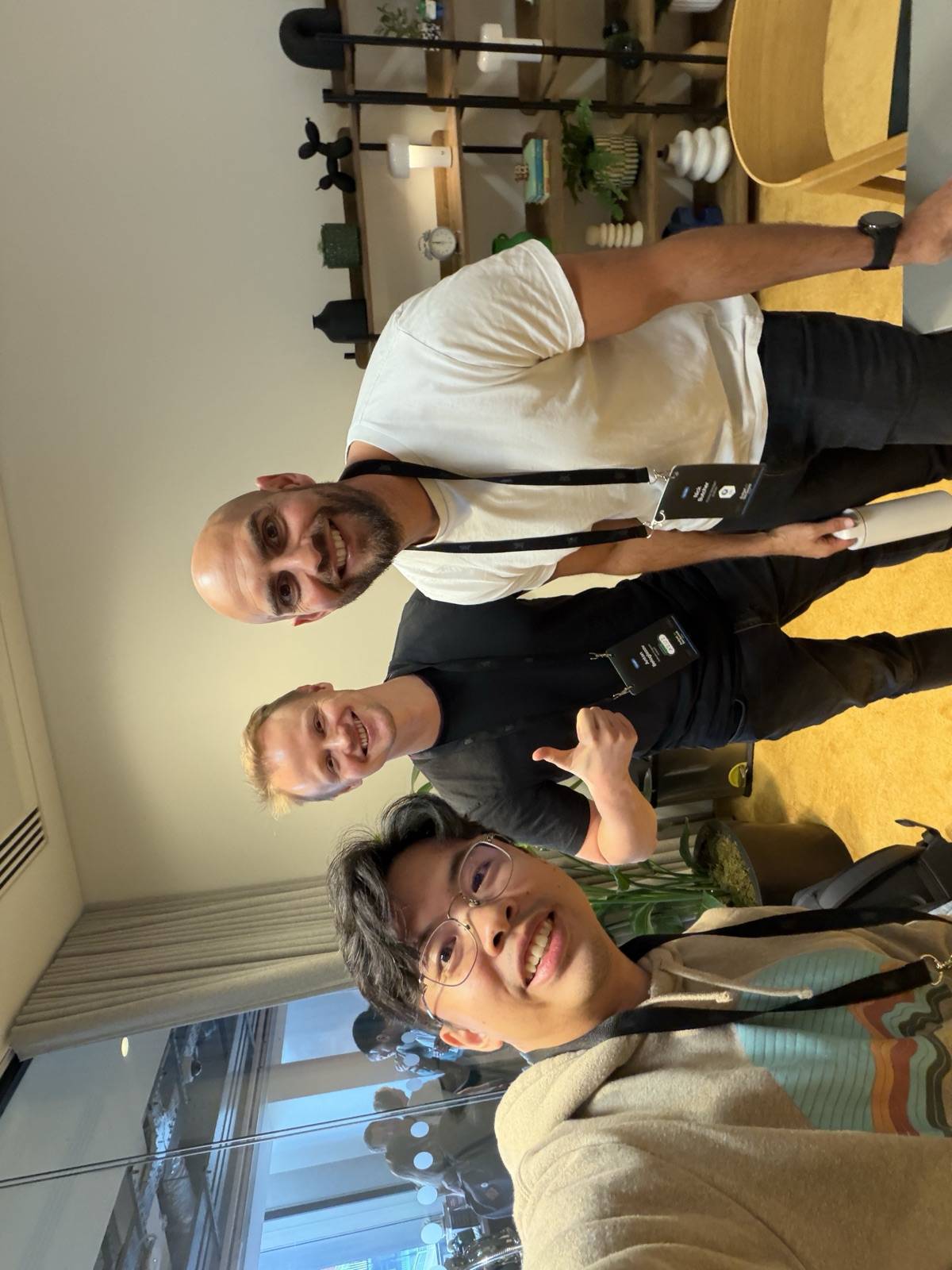
I spent nearly an hour chatting with Nick and Anton from the A2UI Compose team at Android Dev Summit 2026. Their Agent-to-UI renderer for Jetpack Compose (A2UI) had just reached 1.0.0-alpha02, but the official androidx.a2ui:* and androidx.compose.material3:material3-a2ui artifacts only target Android. Answering questions at the event, they said several times that KMP / CMP support isn't a near-term priority. Two or three other developers walked up to ask about KMP support as well; since I had already written a deep dive on Google A2UI in my minibook GenUI Field Notes, I offered on the spot to port it and open-source the result.
Instead of writing a third-party reimplementation from scratch, I built a migration pipeline directly on top of the official A2UI sources, ported them to Kotlin Multiplatform, and open-sourced a2ui-kmp. On Android, Gradle Module Metadata redirects consumers straight to Google's official artifacts so you run Google's unmodified code; on Desktop (JVM) and iOS, a thin compatibility layer compiles those same AOSP sources while keeping the original androidx.a2ui.* package names and APIs intact.
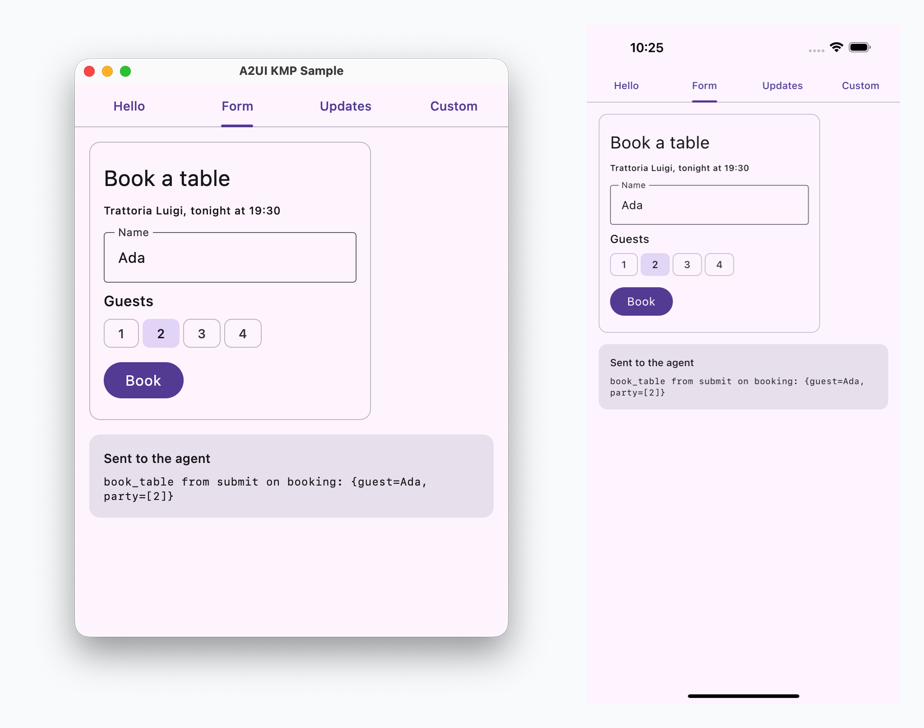
The booking form above runs the exact same A2UI message stream handling and outbound event logic in commonMain across macOS Desktop and the iOS Simulator.
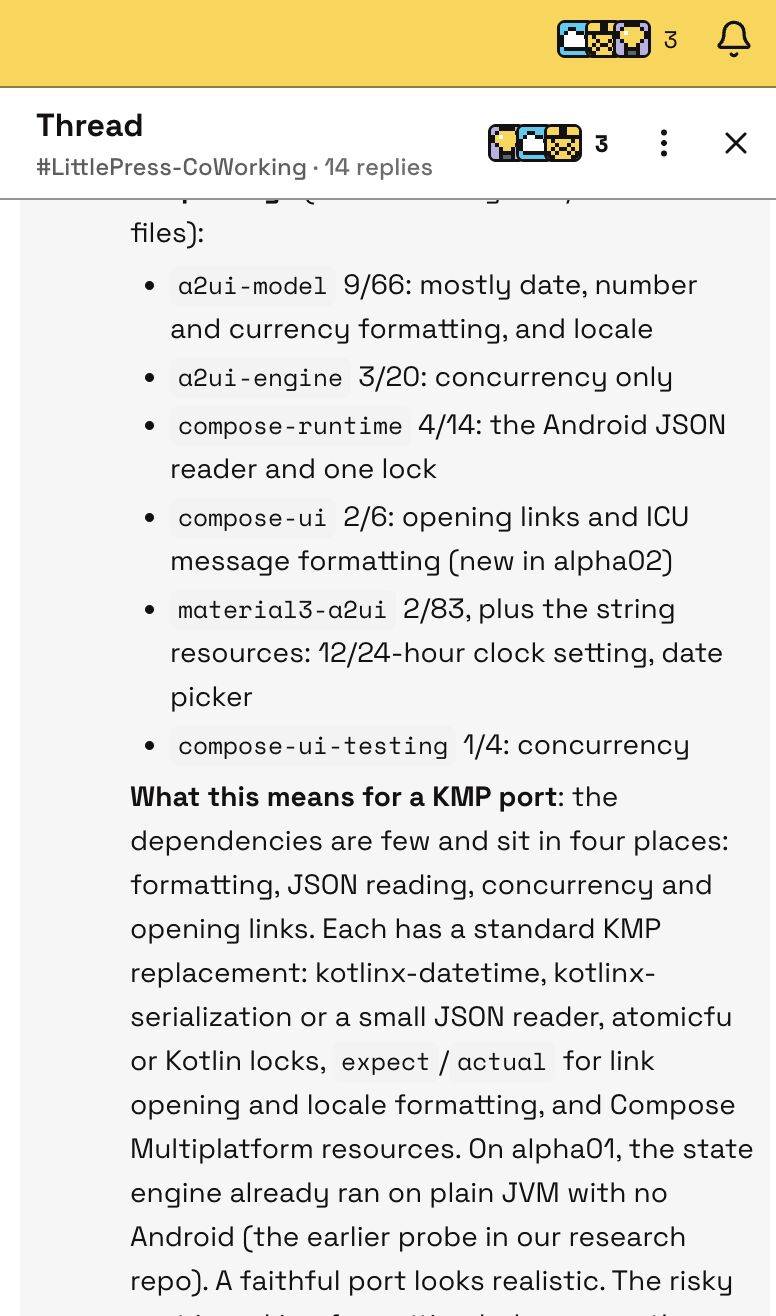
Scoping out the codebase showed that the platform gaps came down to fewer than ten categories, and two-thirds of the upstream source files didn't need a single edit. That let me focus on the architecture and engineering boundaries:
- Keeping package boundaries clean so script-synced files stay untouched by hand while AI-written compatibility code lives in its own module;
- Sharing a single dependency version catalog across subprojects, and wiring the Kotlin 2.3 and 2.4 builds together via
includeBuild/ Composite Build so the repo works out of the box in the IDE; - Verifying the multiplatform compatibility layer against ground-truth output recorded from the official Jetpack Compose release.
Let's start with how to add the library to your project, and then walk through the architectural trade-offs behind it.
Quick Start
Adding a2ui-kmp to a KMP project starts with one key version constraint. The official Jetpack Compose release of A2UI depends on the latest Compose alpha and is compiled with Kotlin 2.4. Because Gradle upgrades Compose and kotlin-stdlib in the host app to the minimum versions required by its dependencies—and an older Kotlin compiler cannot read an iOS klib produced by a newer compiler—we split the modules into two tiers:
- The 5 core packages (
a2ui-model,a2ui-engine,compose-runtime,compose-ui,compose-ui-testing) are built with Kotlin 2.3.21 and Compose Multiplatform 1.12.2 (Compose runtime 1.12.1). Because none of them require Kotlin 2.4, iOS apps on Kotlin 2.3 or newer can use them right away. material3-a2uiis built with Kotlin 2.4.0 and Compose Multiplatform 1.13.0-beta01, because upstream uses Material 3 APIs that only landed in CMP 1.13 (more on why in the Build Architecture section below). We'll move it to stable CMP 1.13 once that ships.- On Android, dependencies resolve directly to Google's official 1.0.0-alpha02 artifacts and inherit the upstream requirements: compileSdk 37 when using
a2ui-model/a2ui-enginealone; compileSdk 37.1 and Jetpack Compose 1.13.0-alpha03 fromcompose-runtimeupward; and Material 3 1.5.0-alpha28 when usingmaterial3-a2ui.
With those versions in place, add the modules you need to gradle/libs.versions.toml. We recommend adding a -kmp suffix to the catalog aliases to distinguish them from Google's Android-only coordinates:
# gradle/libs.versions.toml
[versions]
a2ui = "1.0.0-alpha02"

[libraries]
a2ui-material3-kmp = { module = "ai.littlepress.a2ui:material3-a2ui", version.ref = "a2ui" }
a2ui-compose-ui-kmp = { module = "ai.littlepress.a2ui:compose-ui", version.ref = "a2ui" }
The 6 published KMP artifacts map 1:1 to Google's official Android artifacts:
ai.littlepress.a2ui:* Artifact |
Purpose | Android Resolution Target |
|---|---|---|
a2ui-model |
Core data layer for app and component developers | androidx.a2ui:a2ui-model |
a2ui-engine |
Message and data-binding engine for renderer authors (no Compose dependency) | androidx.a2ui:a2ui-engine |
compose-runtime |
Compose A2UI renderer runtime (state and data binding) | androidx.a2ui.compose:compose-runtime |
compose-ui |
Compose A2UI renderer and catalog API (without Material 3) | androidx.a2ui.compose:compose-ui |
compose-ui-testing |
Testing APIs for custom catalog components | androidx.a2ui.compose:compose-ui-testing |
material3-a2ui |
Basic component catalog built on Compose Material 3 | androidx.compose.material3:material3-a2ui |
Most projects only need a2ui-material3-kmp (to use the Material 3 Basic Catalog out of the box) or a2ui-compose-ui-kmp (to build a custom component catalog), without worrying about the other four modules. The snippet below—taken from samples/composeApp/src/commonMain/kotlin/sample/material3/A2ui.kt and FormSample.kt—shows how to initialize A2uiMessageProcessor, feed agent messages, and collect user interaction events in commonMain (the sample agent doesn't send images, video, or audio, so those three callbacks are no-ops; a real app plugs in its own image loader and media players here):
import ai.littlepress.a2ui.compat.android.content.Context
import androidx.a2ui.compose.runtime.A2uiMessageParser
import androidx.a2ui.compose.ui.A2uiMessageProcessor
import androidx.a2ui.compose.ui.catalog.A2uiBasicCatalogV1
import androidx.a2ui.model.processor.A2uiMessageProcessor
import androidx.a2ui.model.processor.processInput
import androidx.compose.foundation.layout.Arrangement
...

@Composable
fun rememberA2uiProcessor(): A2uiMessageProcessor {
    val processor = remember {
        val catalog = materialA2uiBasicCatalogV1(
            // The sample's agent sends no images, video or audio, so these three
            // slots are empty; a real app plugs its image loader and players in here.
            image = MaterialA2uiBasicCatalogV1Defaults.image { _, _, _, _, _ -> },
            video = MaterialA2uiBasicCatalogV1Defaults.video { _, _, _ -> },
            audioPlayer = MaterialA2uiBasicCatalogV1Defaults.audioPlayer { _, _, _, _ -> },
            functions = A2uiBasicCatalogV1.Functions(Context()), // ①
        )
        A2uiMessageProcessor(catalogs = listOf(catalog))
    }
    LaunchedEffect(processor) { withContext(Dispatchers.Default) { processor.collectMessages() } }
    return processor
}

@Composable
fun A2uiSurfaces(processor: A2uiMessageProcessor, modifier: Modifier = Modifier) {
    val surfaces by processor.activeSurfaces.collectAsState()
    Column(modifier, verticalArrangement = Arrangement.spacedBy(16.dp)) {
        surfaces.forEach { surface -> key(surface.id) { A2uiSurface(surface) } }
    }
}

@Composable
fun FormScreen(incomingJsonLines: List<String>, onSendToAgent: (String) -> Unit) {
    val processor = rememberA2uiProcessor()
    LaunchedEffect(processor) {
        val parser = A2uiMessageParser()
        incomingJsonLines.forEach { json -> processor.processInput(parser, json) }
        processor.outboundEvents.collect { message -> onSendToAgent(message.toString()) }
    }
    A2uiSurfaces(processor)
}
Here, rememberA2uiProcessor() creates a message processor wired to the Material 3 Basic Catalog and drains its message queue on a background coroutine. FormScreen feeds incoming JSON lines from the agent into processor and collects form submission events from outboundEvents. (If you look closely at the imports, you'll notice two A2uiMessageProcessor symbols—one is the top-level factory function under compose.ui, and the other is the interface under model.processor, which is how upstream designed it.)
Calling A2UI from commonMain only differs from Android-only code in two small places:
- Two upstream public interface methods take
java.util.Localein their signatures; incommonMain, that maps toai.littlepress.a2ui.compat.java.util.Locale(which is a typealias tojava.util.Localeon JVM and Android). - At ①,
A2uiBasicCatalogV1.Functions(context)takes anandroid.content.Contexton Android, whereas on Desktop and iOS you passai.littlepress.a2ui.compat.android.content.Context()(which delegates to the host OS browser to open URLs).
Source Migration Architecture
Keeping Google's original package names and public APIs on top means handling the JDK and Android types referenced underneath. Across the 193 .kt files in the 6 upstream modules, the Compose UI rendering code barely touches Android-specific APIs, but references to java.util.Locale, SimpleDateFormat, NumberFormat, ICU MessageFormat, android.util.JsonReader, android.content.res.Resources, and ReentrantLock show up across the codebase.
Design review and the early iterations helped us rule out two approaches:
1. Platform APIs and Compatibility Layer
Could we keep the java.* package names directly? We considered declaring package java.util inside iosMain for a custom Locale so we wouldn't even have to touch upstream import statements. That falls apart in multiplatform: because two upstream public interfaces expose java.util.Locale in their method signatures, the type has to live in commonMain—and on the JVM, the classloader rejects any user-defined java.* package at load time (SecurityException: Prohibited package name) on top of colliding with the JDK's built-in classes. Putting all shims under ai.littlepress.a2ui.compat.* and pairing them with rule-based import rewriting solved both problems cleanly.
2. Upstream Sync and Directory Layering
The other question was how to sync upstream code and structure the repo so upstream snapshots and our own code never get tangled up. Mirroring AOSP's internal build workflow wasn't necessary—pulling the latest release head directly from the AOSP git repository (including upstream's unit tests and raw resource directories) is enough. Separating the upstream and downstream directories let us enforce a strict boundary: upstream syncing and mechanical rewrites are handled exclusively by scripts; multiplatform compatibility code lives in its own module, written with AI assistance and verified through code review and testing. The repository is structured around that split:
a2ui-kmp/
├── source/                  # read-only upstream snapshot
│   ├── UPSTREAM             # the AOSP commit it came from
│   ├── a2ui/
│   └── material3-a2ui/
├── target/
│   ├── build-logic/         # source + overlays -> commonMain
│   ├── a2ui-kmp/            # Kotlin 2.3 build: 5 core packages
│   │   ├── a2ui-compat/     # hand-written compatibility layer
│   │   ├── a2ui-model/
│   │   │   ├── overlay-generated/      # rule-based rewrites
│   │   │   └── overlay-generated.json  # rules + sha256
│   │   ├── a2ui-engine/
│   │   └── compose/
│   └── material3-a2ui-kmp/  # Kotlin 2.4 build: material3-a2ui
│       ├── overlay-generated/
│       ├── overlay-manual/  # hand-written (one file today)
│       └── resources-generated/  # generated translations
├── tests/integration/       # tests against published artifacts
├── samples/
└── scripts/                 # sync, rewrite, verify, record
3. Overlay Replacement and Change Verification
The files compiled into commonMain fall into five layers, each with a single way it gets updated:
source/(read-only AOSP snapshot, managed bysync-upstream.py): Pullssource/a2ui/andsource/material3-a2ui/at the AOSP commit pinned insource/UPSTREAM(forandroidx.a2ui1.0.0-alpha02), verified file-by-file in CI bycheck-upstream.py. Out of 193 upstream.ktfiles, 124 compile as-is without a single line changed.target/*/overlay-generated/(rule-based rewrites, managed bygenerate-overlays.py): Of the remaining 69 files that touch platform APIs, 68 only need deterministic mechanical rewrites—mostly repointingjava.*/android.*imports toai.littlepress.a2ui.compat.*, plus replacingLocale.USconstants and::class.java.simpleName(see DEVELOPMENT.md for the full rule table). Each module'soverlay-generated.jsonrecords the applied rule names and the sha256 of the upstream file.target/*/overlay-manual/(hand-maintained replacements, verified byoverlay-manual.json): If a file needs even a one-line logic change beyond the fixed rewrite rules, it isn't allowed inoverlay-generated/and must go intooverlay-manual/. Across all 193 source files in the repo, only one file sits here today:ShimmerIndicator.kt. On Android, the original implementation mutates the same shader'slocalMatrixevery animation frame; on Desktop and iOS, Skia shaders are immutable once created, so we recreate theRadialGradientShadereach frame with the current offset and radius.target/a2ui-kmp/a2ui-compat/and each module's ownsrc/(compatibility layer, maintained separately): ImplementsLocale, ICUMessageFormat, CLDR 45 plural rules, date/number/currency formatting, a strictJsonReader, and a FIFO-fairReentrantLockon iOS. Everything here lives underai.littlepress.a2ui.compat.*without touching upstream directories.resources-generated/and recorded reference fixtures, also generated or recorded by script and never edited by hand: For example, the localized strings inmaterial3-a2ui(85 locales, 11 strings each) are generated from upstream'sres/values*/strings.xmlintotarget/material3-a2ui-kmp/resources-generated/.
upstreamSources(...) in target/build-logic wires all of this together for the compiler: it adds source/ to commonMain, excludes any relative paths present in the two overlay directories, and splices the overlay directories in instead.
If Google modifies an overlaid file in a future upstream release, the sha256 check in the manifest fails immediately during the build and points straight to the changed file. For day-to-day code reviews, we can focus on the hand-written code (overlay-manual/ and a2ui-compat/) and architectural changes.
Build Architecture
The Gradle build setup went through just as much iteration as the source layering.
Because material3-a2ui and the 5 core packages underneath require different Kotlin and Compose Multiplatform versions, the repo has to be split into two separate Gradle builds. In the Coding Agent's first attempt, dependency versions were scattered across gradle.properties, the material3 build reached into the other build's buildSrc via srcDir, and—worse yet—for samples/ to depend on the local libraries, the initial proposal required running a CLI publish task before you could even open the project in the IDE for the first time.
That kind of Gradle duct tape is painful to look at, and even if humans rarely edit the build scripts by hand, a fragile build is just as error-prone for AI agents to maintain. Drawing on the Composite Build patterns from Section 2-1 of my book Extending Android Builds, we refactored the build into the structure below:
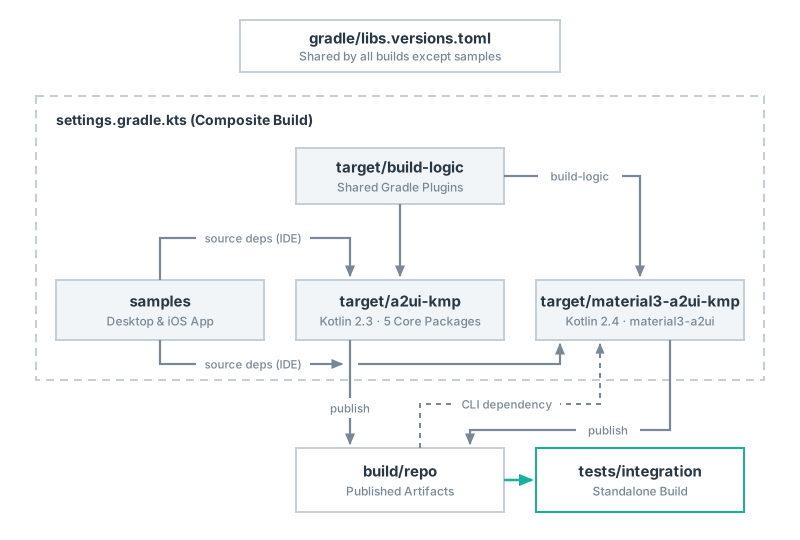
Here is how the three key pieces of this build fit together.
1. A Single Root Version Catalog Shared Across Builds
Maintaining multiple standalone Gradle builds in one repo often leads to duplicated versions across gradle.properties files or the overhead of an internal BOM. Instead, we keep a single gradle/libs.versions.toml at the repo root (with comments noting which versions come from upstream 1.0.0-alpha02 and why others were bumped), and point target/a2ui-kmp, target/material3-a2ui-kmp, target/build-logic, and tests/integration at that same file via from(files(...)):
// target/a2ui-kmp/settings.gradle.kts
dependencyResolutionManagement {
    versionCatalogs {
        create("libs") {
            from(files("../../gradle/libs.versions.toml"))
        }
    }
}
The only exception is samples/: it keeps its own standalone samples/gradle/libs.versions.toml so the sample project can be copied out directly as a self-contained starter template.
2. Dual Kotlin 2.3 / 2.4 Builds & Replacing buildSrc with build-logic
Why not just bump all 6 modules to Kotlin 2.4 and compile everything in a single Gradle build?
It comes down to iOS klib ABI compatibility. Upstream material3-a2ui uses MaterialTheme.motionScheme, the new Slider and ExposedDropdownMenu overloads, TimePickerState.isInputValid, and other APIs that only landed in Compose Multiplatform 1.13.0-beta01—which is aligned with Kotlin 2.4.0. Because an older Kotlin compiler cannot read an iOS klib with a newer ABI version, material3-a2ui has to be compiled with Kotlin 2.4.0.
On the flip side, if we also compiled the 5 core packages with Kotlin 2.4.0, any iOS app still on stable Kotlin 2.3 + CMP 1.12.2 that only needs the core renderer or a custom catalog wouldn't be able to use them at all. Splitting target/a2ui-kmp (Kotlin 2.3.21 + CMP 1.12.2) from target/material3-a2ui-kmp (Kotlin 2.4.0 + CMP 1.13.0-beta01) keeps the 5 core packages compatible with Kotlin 2.3: during CLI builds, the core packages publish to the local build/repo first so the material3 build can consume them, while both builds target Kotlin 2.2 for metadata and bytecode.
To share convention plugins between two builds running different Kotlin versions, we replaced buildSrc with a standalone target/build-logic build and declared its plugin dependencies as compileOnly:
// target/build-logic/build.gradle.kts
plugins {
    `kotlin-dsl`
}

dependencies {
    compileOnly(libs.kotlin.gradlePlugin)
    compileOnly(libs.mavenPublish.gradlePlugin)
}
That way, target/build-logic compiles against the Gradle plugin APIs without forcing a fixed Kotlin version onto either build's classpath. Each build brings its own Kotlin version while sharing the source-overlay logic and publishing configuration from build-logic (which also patches the generated .module metadata so Android consumers automatically resolve Google's official androidx.a2ui artifacts).
3. Root Composite Build and Why tests/integration Stays Outside
So the repo works out of the box in Android Studio or IntelliJ IDEA, a root settings.gradle.kts wires the development builds together into a Composite Build via includeBuild:
// settings.gradle.kts
rootProject.name = "a2ui-kmp-repository"
includeBuild("target/build-logic")
includeBuild("target/a2ui-kmp")
includeBuild("target/material3-a2ui-kmp")
includeBuild("samples")
Opening the repo root in the IDE lets Gradle automatically substitute samples's ai.littlepress.a2ui:* dependencies with the local source modules. Right after cloning, you can run samples without running any publish tasks first, and Cmd-click straight from sample code into the library sources to set breakpoints.
Notice one deliberate omission in the root settings.gradle.kts above: tests/integration is not included via includeBuild.
That's intentional. A lot of critical metadata only exists in the published Maven artifacts—if Gradle substitutes those dependencies with local project sources inside a Composite Build, you completely bypass what downstream users actually consume. For instance, a source-substituted build won't catch broken .module forwarding to Google's Android artifacts, an unexpected iOS klib ABI version, or a missing transitive dependency for downstream consumers. Instead, tests/integration runs as a standalone build that resolves ai.littlepress.a2ui exclusively from the freshly published local ../../build/repo directory using exclusiveContent:
// tests/integration/settings.gradle.kts
dependencyResolutionManagement {
    repositories {
        // ai.littlepress.a2ui comes from the artifacts just built only: a missing one fails.
        exclusiveContent {
            forRepository { maven { url = uri("../../build/repo") } }
            filter { includeGroup("ai.littlepress.a2ui") }
        }
        google()
        mavenCentral()
    }
    // The repository's one version catalog.
    versionCatalogs { create("libs") { from(files("../../gradle/libs.versions.toml")) } }
}
If even one artifact is missing from build/repo, the build fails immediately instead of silently falling back to Maven Central. Our verification script runs tests/integration twice: once with -Pa2uiIntegration=minimum on Kotlin 2.3.21 to test the 5 core packages, and once with -Pa2uiIntegration=all on Kotlin 2.4.0 to test all 6 packages including material3-a2ui.
Testing and Behavioral Alignment: Recording Ground Truth from Android
Locking down the source layers and build boundaries made splitting up the work across AI agents straightforward: one agent wrote the multiplatform compatibility code inside a2ui-compat, a second agent reviewed it independently against the upstream sources, and I focused on architecture and acceptance criteria.
The big question was: how do we know the AI-written a2ui-compat code on Desktop and iOS actually behaves the same as Android?
Our first instinct was to use kotlinx-datetime for dates, delegate to java.text.NumberFormat on the JVM, and call Foundation.NSNumberFormatter on iOS. Digging into the edge cases during the second design review showed why that wouldn't hold up: the JDK's java.text and Apple's Foundation disagree with Android on plenty of cases out of the box—for example, decimal precision for JPY (0 decimal places) or the date pattern letter u (which means day-of-week 1..7 in Android's SimpleDateFormat, but extended year in Apple's ICU). Calling each platform's default formatters directly would guarantee subtle inconsistencies across platforms.
To keep the tests from sharing the same blind spots as the implementation, we spun up an Android 15 emulator (API 35, ICU 75.1 / CLDR 45 / Unicode 15.1), recorded the actual output of the official Jetpack Compose release, and checked those recordings into tests/integration as ground-truth fixtures for Desktop and iOS:
- Number and currency formatting: Checks number formatting across 50 locales along with currencies like JPY (0 decimals) and KWD (3 decimals). Desktop and iOS use the digit sets and AM/PM strings recorded from Android, while iOS follows ICU in outputting each locale's default CLDR numbering system (such as Arabic-Indic digits for Arabic).
- Plural rules and date formatting: Covers 836 ICU
MessageFormatplural andselectordinalcases across 20 locales, date formatting across 19 locales, 260 date patterns (52 pattern letters × widths 1–5), andmaterial3-a2uidate andCalendarcases across 29 locales. - Resource resolution and strict JSON parsing: Ports AOSP's resource locale-matching logic and Android 15 region fallback tables, verifying that 174 locales resolve to the exact same resource directories as on the Android 15 emulator; 30 valid and malformed JSON payloads (including leading BOMs) verify that Desktop and iOS even throw the exact same exception messages as Android.
Running against these recordings also surfaced a few low-level platform differences—for example, under ja-JP, iOS formats the yen sign as half-width "¥" while Android outputs full-width "¥". We pinned those known differences explicitly in the test assertions and documented the full list in CHANGELOG.md.
Reusing Upstream Tests & Automating Maintenance
Because source/ pulls the full upstream directory tree from AOSP, we also hooked upstream's own test suites directly into our build:
- Upstream unit tests: All 1,446 upstream unit tests across the 6 modules run unmodified on Desktop (JDK 21).
- Upstream Compose UI tests: With lightweight Android test-runner and annotation stand-ins under
tests/android-test-stand-ins, upstream's instrumented tests run directly on Desktop via Compose Multiplatform'srunComposeUiTest—passing 527 UI tests inmaterial3-a2uiand all 57 UI tests incompose-ui-testing(584 total). On top of that,scripts/verify-samples.shbuilds and launchessampleson both Desktop and the iOS Simulator to verify end-to-end interactions. - Skipped tests: Only 8 upstream UI tests in
material3-a2uiare skipped on Desktop—4 because they trigger the Android system back button, and 4 because they rely onStateRestorationTester, which Compose Multiplatform hasn't implemented on Desktop yet.
Two automated checks keep day-to-day maintenance and releases low-friction:
scripts/check-requirements.pyruns after every local publish tobuild/repo, inspecting the generated Gradle.modulefiles and thedefault/manifestinside each iOS klib to verify that the version requirements table inREADME.mdmatches the actual build artifacts..github/workflows/release-watch.ymlrunsscripts/check-new-releases.pyevery night, opening a deduplicated issue in the repo whenever a new version ofandroidx.a2uiormaterial3-a2uilands on Google Maven—or when the stable Compose Multiplatform 1.13 release ships.
That nightly release-watch issue also sets up the next step we want to explore with tools like Pullfrog: wiring up an automated "issue opened → sync & open PR" loop where an AI agent runs sync-upstream.py, generate-overlays.py, and the full verify.sh suite in a sandbox and opens a pull request on its own. The scripts catch source-sync, version, and artifact mismatches upfront, leaving humans to review the changelog and background behind the changes, alongside the compatibility layer implementations, test results, and any updates to architecture or core logic.
a2ui-kmp 1.0.0-alpha02 is now live on Maven Central, and the source is on GitHub at github.com/BinaryTape/a2ui-kmp (sponsored by LittlePress.AI). I think third-party renderers can replace the Material layer with their own components, and much of their work may sit at that level. That goes beyond UI theming: renderers can share much of the same official runtime underneath and build further on that foundation. LittlePress.AI is updating its existing Compose renderer with that goal in mind. The aim is to reuse suitable low-level implementations from this KMP port and extend them to meet our own needs. Give it a try in your KMP projects, and feel free to open an issue if you run into any questions!