I recently switched the Antigravity ACP backend in raft-acp-bridge (see commit da834bc): instead of driving the standalone ACP server 1.1.1, Raft now connects to the agy acp subcommand built straight into Antigravity CLI (verified on 1.5.5; 1.5.1 or newer is recommended for new installs).
With this change, installing and signing in to Antigravity CLI is all you need locally. You can drop the separate agy_acp_server.par and companion localharness_external binaries, which previously took up around 872 MiB on disk just for the entry points. Day-to-day usage in Raft also gets three practical upgrades: if your account has Claude access, Claude models now show up directly in Raft's model picker; you can send follow-up instructions mid-turn (steering) instead of waiting in an in-memory local queue until the current turn finishes; and conversations survive bridge restarts.
This is the third post in my Antigravity integration series (the first two covered the three external invocation modes of agy and reusing Grok Build to bring Antigravity and Maka into Raft). What kicked off this update was a casual chat in our GDE group: a few friends mentioned that Google's official Antigravity extension for VS Code felt pretty smooth in daily use. Around the same time, I asked an agent in Raft to polish three short paragraphs on a card and ended up waiting 11 minutes for a reply (which later turned out to be a system prompt and harness issue). That got me wondering: how does the VS Code extension wire up Antigravity under the hood, and would switching to its path make things faster? We unpacked the extension bundle, saw that it runs on agy --hub, and built a temporary adapter to test both paths side by side.
How the VS Code Extension Connects to Antigravity
Looking inside the official Marketplace package Google.google-antigravity (1.11.0; setup details in the official VS Code docs), the extension doesn't use ACP at all. Instead, it spawns a local agy --hub process, passes the open workspace folders via --add-dir, and loads the chat UI served by hub inside a sidebar Webview. The Webview talks to hub over a local WebSocket (/connect-websocket) to send RPC calls and subscribe to a continuous stream of agent state updates. Meanwhile, the VS Code Extension Host talks to the Webview over postMessage to open files, render diffs, and run background health checks, while keeping the Webview context alive when the sidebar is hidden so you don't lose UI state.
By contrast, Antigravity's ACP interface is much thinner: the client spawns agy acp as a child process, exchanges JSON-RPC messages over stdio, and receives text chunks, tool calls, and permission prompts scoped to each session. Putting the two integration paths side by side makes the structural difference clear:
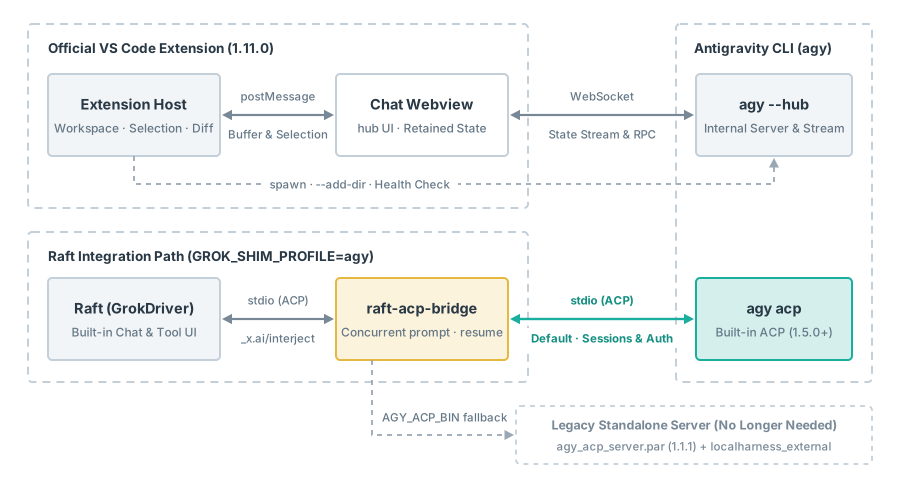
As shown above, the two paths are built for very different host environments:
- Editor context synchronization: When you highlight a few lines in VS Code, the extension's editor watcher sends the active file, selection range, and even unsaved buffer text straight to the chat page. In a standalone group-chat app like Raft, if you only type "help me rewrite the second paragraph," the agent first has to search the directory to locate the draft and figure out which paragraph you mean (though how much editor context the model actually uses, and how many file reads it saves, still depends on the task).
- Adapter maintenance cost: Raft's
GrokDriveralready speaks ACP, soraft-acp-bridgeonly needs to translate handshake details, model prefixes, and a handful of extension calls while passing most session messages straight through. Switching toagy --hubwould mean maintaining a WebSocket state-stream client in the bridge and reassembling low-level step updates into the turns and events Raft expects. And sincehub's internal RPC carries no public stability guarantee, every CLI update would require re-verifying message shapes by hand.
Polishing the Same Three Paragraphs: How Much Do Latency Numbers Differ?
Since we already had a hub test client in hand, we ran a controlled benchmark to check whether --hub was inherently faster than the standalone ACP server 1.1.1 we were using at the time. Both sides used the same account and the same gemini-4-argon-medium model, starting a fresh process and fresh session in an isolated directory on every run, and alternating between ACP -> hub and hub -> ACP:
- Pure text polishing: Three Chinese paragraphs (~300 characters total) placed directly in the prompt with tools disabled, returning only the polished text (0 tool calls, 1 model request per run).
- Fixed file read-write workflow: One command to read the source text from a file, followed by polishing and a second command to write the result back and verify paragraph count and length (2 tool calls, 3 model requests per run).
We ran 6 pairs for each task (24 runs in total), timing from the moment the prompt was sent until both the reply text and the turn-completion signal arrived. For pure text polishing, the median latency was 11.79s on the old standalone ACP server versus 9.21s on hub, with hub coming out faster in 5 of the 6 pairs. Once file reads and writes were involved, however, ACP had a median of 29.65s while hub came in at 32.23s (ACP was faster in 4 of the 6 pairs). In the slowest file-workflow pair, the two took 42.82s and 67.25s respectively, and one of hub's model calls spent roughly 47s just waiting for the first token (timeToFirstToken).
Keep in mind that these numbers compared the standalone ACP server 1.1.1 against --hub on CLI 1.5.3 (driven by a standalone WebSocket test script rather than the full VS Code UI), and the two backends also differed in default context and tool policies. When we later compared built-in agy acp and --hub on the same CLI build, we focused on feature parity and didn't re-run this latency suite. Even so, the takeaway is clear: a two- or three-second gap between integration paths comes nowhere near explaining an 11-minute wait; what actually drags down small tasks is the agent turning a local edit into dozens of tool calls and model round-trips. That part has to be addressed by tuning the prompt and cutting out redundant re-exports; swapping the underlying transport makes no difference.
Why We Still Chose Built-in ACP After Getting --hub Working
As noted in the second post, the old standalone agy_acp_server.par couldn't handle mid-turn steering: sending a second concurrent session/prompt threw an error, so the bridge had to buffer follow-up messages in a local queue. To see if --hub could solve this, we wired up a working hub prototype behind the grok entry point. File reads and edits, one-time permission prompts, model switching, and restart resumption all worked, and if we dropped the WebSocket mid-task and re-subscribed, the running command kept going without interruption.
Mid-turn steering, however, ran into a classic state-attribution problem. In hub, "injecting a follow-up instruction" and "cancelling the running command" are two separate operations. In one test run, we asked the agent to execute a ~24s command and sent a new instruction partway through. The model picked up the new goal right away and replied in about 15s, while the old 24s command kept running in the background. Once that old command finished, hub appended its output to the trajectory and triggered another model generation step, producing a second, nearly identical reply. Because those two replies came from two separate planning steps rather than duplicate WebSocket frames, simple frame deduplication wouldn't catch it. For Raft, an adapter would have to track which step each piece of text and late tool result belonged to, decide when to close the open turn, and issue separate cancellation requests whenever the user clicked stop.
Right as we were weighing whether to build out all that state tracking, we checked the Antigravity CLI release notes and spotted two timely updates. CLI 1.5.0 added a built-in agy acp subcommand with native support for steering an active session via a second concurrent session/prompt, along with session/resume for session recovery. Right after that, 1.5.1 opened up all account-available models to ACP clients. Whether you use --hub or agy acp, both now launch from the same ~199 MiB Antigravity CLI binary, eliminating the old standalone server bundle altogether.
That made the changes in raft-acp-bridge's session adapter (src/shim.js) much cleaner:
- Mid-turn steering: When Raft sends
_x.ai/interjectwhile an agent is busy, the bridge sends anothersession/promptto the sameagy acpsession and holds back the completion response for the active Raft turn until all submitted prompts have settled. - Session resumption: The bridge maps Raft's
session/loadtosession/resume. We avoided callingsession/loaddirectly because in our 1.5.3 tests, passing a random non-existent ID tosession/loadstill returned success (just without replaying any history), which would trick Raft into thinking a missing session was still alive.session/resumeexplicitly returns a read error instead, allowing the bridge to translate it into"session not found"so Raft can fall back to creating a fresh session.
Running a full verification pass on CLI 1.5.5 confirmed the whole flow: after setting a secret passphrase on Gemini and switching mid-session to Claude, Claude recalled the passphrase accurately; restarting the bridge and resuming via session/resume preserved it as well; and cancelling a streaming turn left the session clean for the next prompt. Sending follow-up messages mid-turn in Raft steered the agent onto the new direction as expected, though in one run where we interjected after reply text had already started streaming, waiting for the whole turn to settle still took around 34s.
Overall, if you are building a rich editor integration like the VS Code extension, hub's state-stream subscriptions, background task controls, and editor hooks are well worth studying. For a host like Raft that already provides its own chat UI and tool views, built-in agy acp covers the session operations we need with far fewer moving parts. For daily use, stick with GROK_SHIM_PROFILE=agy (see the setup and upgrade guide in the repo docs). If you are upgrading from the old standalone ACP server, remember to rescan runtimes in Raft and restart the corresponding agent; some older sessions from the standalone server will need a fresh conversation.